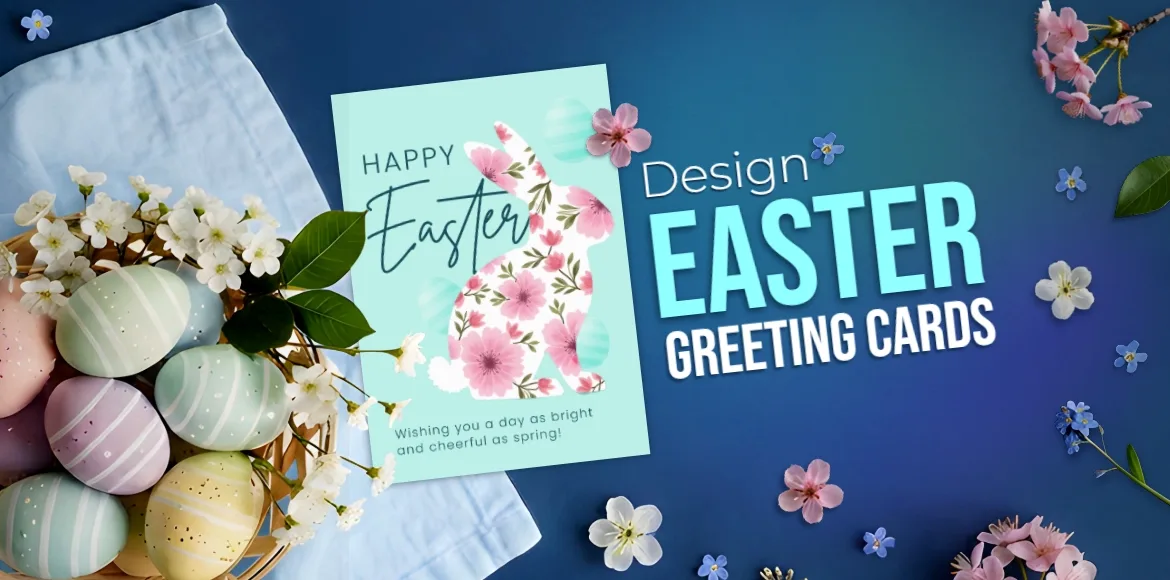

This Easter, let your message bloom with a personalized touch. Skip the generic, store-bought cards and create a heartfelt Easter greeting that reflects your love, joy, and creativity in just minutes. With Pixlr’s AI-powered tools, no design skills or hours of work are needed. All you need is your idea and a little springtime inspiration.
Say goodbye to the usual templates. Pixlr helps you craft something unique. Add a photo from your family’s Easter morning, write a warm note for grandparents, or generate soft, spring-themed artwork like pastel eggs, cheerful bunnies, or blooming tulips with a simple text prompt. Every card becomes a personal keepsake, not just another seasonal note.
Best of all, it’s effortless. Open your browser, bring your vision to life with intuitive AI tools like the AI Image Generator, Generative Expand, and one-click enhancements, and finish with a polished, beautiful card that is ready to print or share digitally. There are no downloads, no steep learning curve, just pure creative joy, all in time for Easter.
Because this season isn’t just about celebrating. It’s about connection. With Pixlr, your Easter greeting can be as unique and meaningful as the people who receive it.
Create a Truly Personal Easter Card
Now, think about the last time you received a card that made you smile, not just because of the message, but because of the thought and care behind it. That’s what makes personalized Easter cards with Pixlr so special. Unlike mass-produced alternatives, your handcrafted digital creation carries a piece of your heart.
Go beyond the usual Easter imagery. Maybe your sibling loves purple more than pastels. Perhaps your nephew is fascinated by dinosaurs. Why not design a unique Easter card featuring dinosaurs with Easter eggs in a spring garden? Pixlr’s AI tools allow you to incorporate personalized details, such as family photos, custom color schemes that match your recipient’s preferences, and messages that speak directly to your relationship.
What makes these cards even more meaningful is that they last. Long after Easter, recipients keep these thoughtful creations, displaying them on refrigerators or tucking them into photo albums as timeless keepsakes. Your greeting card becomes a tangible reminder of the bond you share and the care you took to create something special.
Step-by-Step Easter Card Creation Using Pixlr
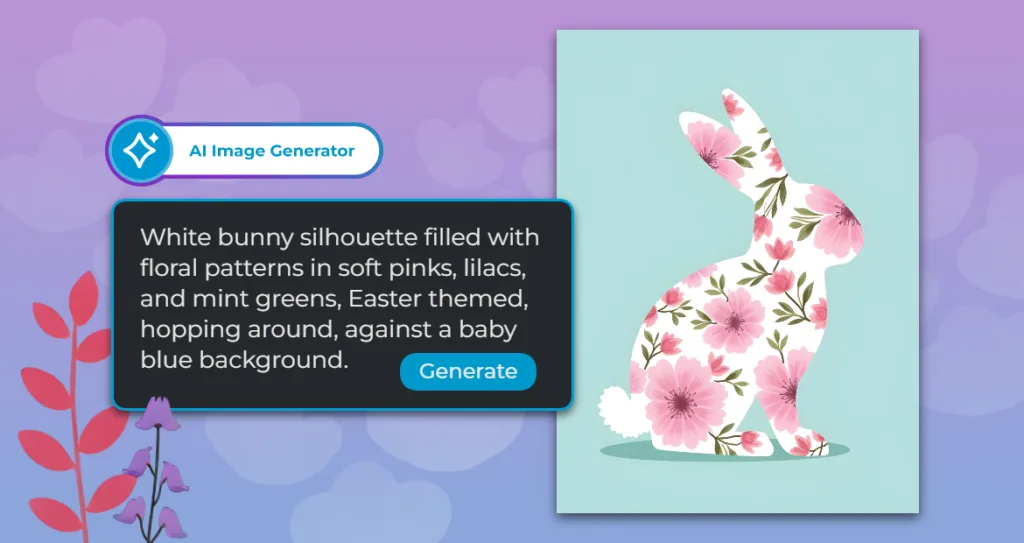
Step 1: Generate your Easter Greeting Card base
Use Pixlr’s AI Image Generator to create a unique Easter-themed image. Try this prompt: “White bunny silhouette filled with floral patterns in soft pinks, lilacs, and mint greens, Easter themed, hopping around, against a baby blue background.”
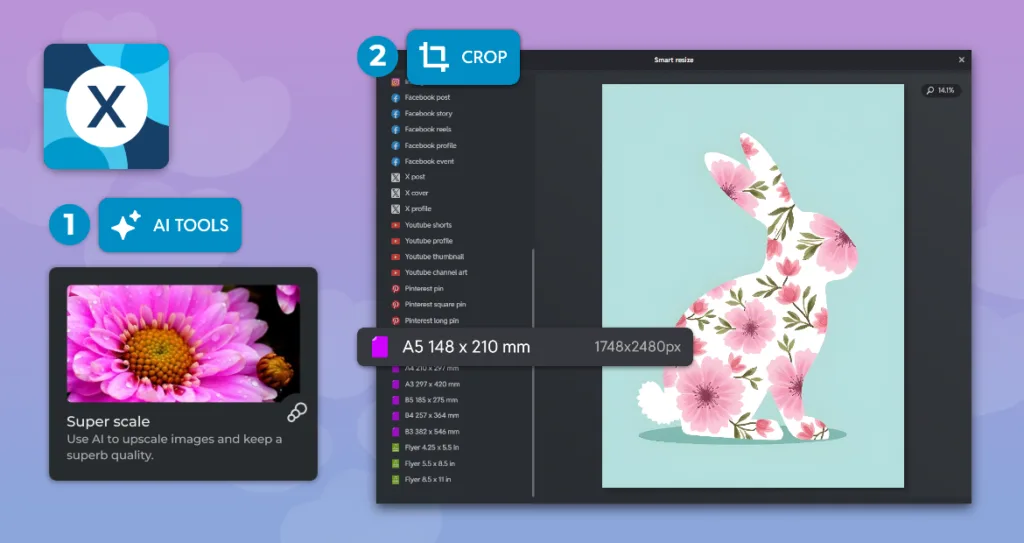
Step 2: Enhance Your Image with Super Scale and Smart Resize
Open your image in Pixlr Express and use the “Super Scale” feature to increase its resolution, ensuring higher definition and better quality for printing. Next, apply the “Smart Resize” tool to adjust the image to the A5 size, perfect for your project.
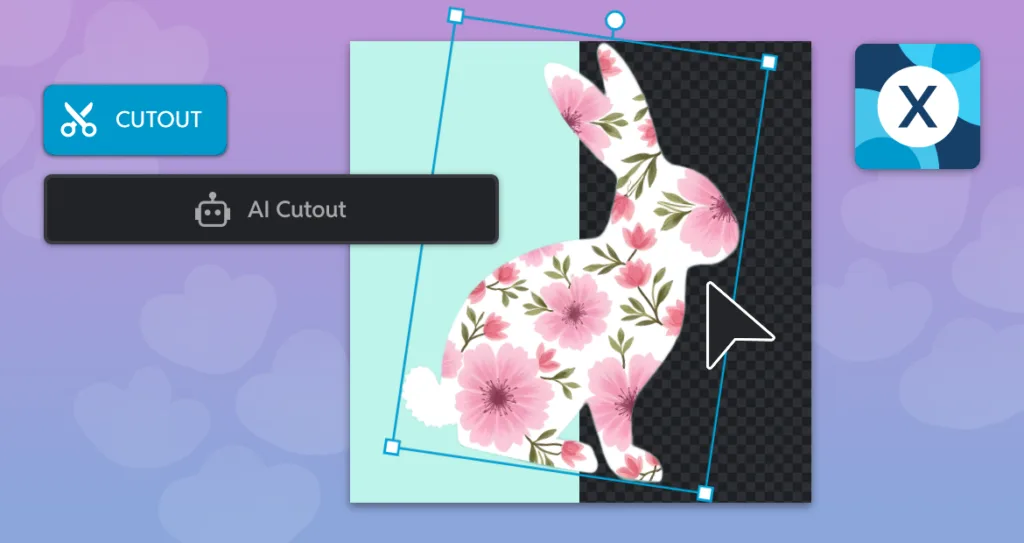
Step 3: Create a cutout with Pixlr AI Remove Background
In Pixlr Express, start by using the “AI Remove Background” tool, represented by a scissors icon in the ‘Cutout’ section of the left navigation panel, to automatically remove the background from your image. Once the background is removed, locate the “Background” button in the right layer panel and hover over it. Click on the “Background” button and use the “color-pick” tool to select and apply a new background color, giving your image a vibrant and customized backdrop.
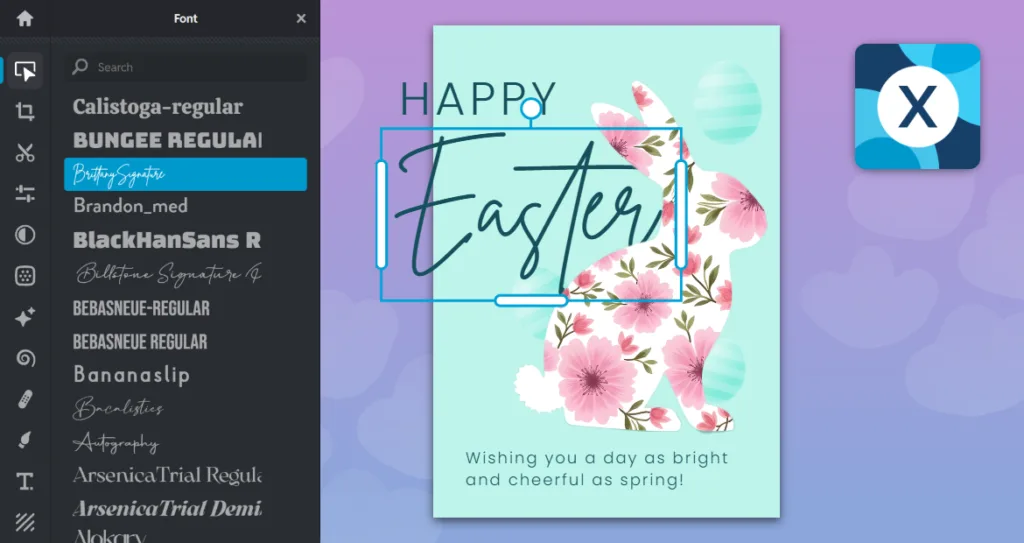
Step 4: Add text and Elements
Select a font from Pixlr’s extensive font library and type your Easter greetings and wishes. Next, navigate to the Elements panel and search for “Easter” to add festive elements to your design. Use the Adjust panel to fine-tune your elements, adjusting their size, color, blending mode, or opacity to perfectly match your design.
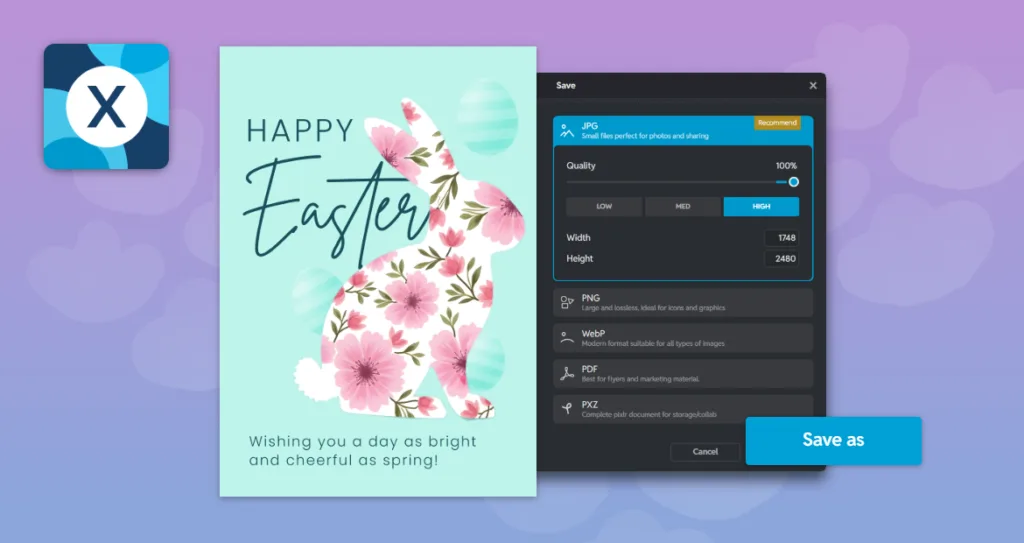
Step 5: Save your Easter greeting card
Once you’re satisfied with your design, click “Save” in the bottom right corner of Pixlr Express. Choose your preferred file format, and you’re all set! Your custom Easter greeting card is now ready to share or print.
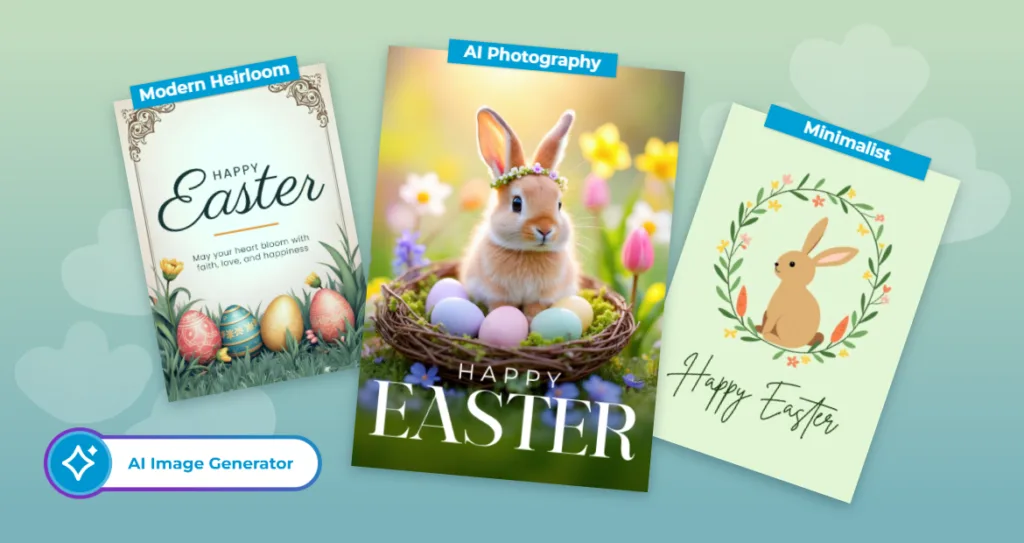
Best Design Ideas for Easter Greeting Cards in 2026
The most memorable Easter cards aren’t just pretty, they feel personal. Whether you’re making something for your mum, your best friend, or your teachers, the right design choice can turn a simple card into something people actually keep. Here are the trends shaping Easter cards in 2026, along with ideas to help you bring them to life.
Modern Heirloom: Where Vintage Meets Today
There’s something special about designs that feel like they’ve always existed, and that’s exactly the appeal of the “modern heirloom” style. These cards blend classic Victorian Easter imagery with clean, contemporary layouts, pairing timeless motifs, like ornate eggs and spring blossoms, with modern typography and subtle digital textures. The result? Cards that feel both nostalgic and fresh, the kind your grandmother and relatives would love.
Try generating images like these:
- “Victorian style Easter greeting card with wide copy space on top, decorated with beautifully patterned Easter eggs, subtle paper texture.”
- “Vintage Easter egg hunt illustration layered with contemporary pastel gradients, subtle paper texture”
- “Vintage Easter illustration of a newly hatched chick from a blue Easter egg with white geometrical patterns, surrounded by colorful spring flowers, subtle paper texture, bottom wide copy space”
Minimalist Easter: Less Is More
Sometimes the most heartfelt cards say everything with just one simple image. Minimalist Easter designs are growing in popularity among those who want their cards to feel intentional and not cluttered. These thoughtful designs often hit harder than the busiest ones. They’re also easier to personalise. With just one focal element, there’s always room for your own message to take center stage.
Try generating images like these:
- “Illustration of a child’s handprint transformed into a pastel spring flower, with a butterfly flying around it, against a cream-colored background, with the text “Happy Easter”.
- “A small painted blue Easter egg with striped patterns in the middle, against a cream-colored background.”
- “A charming Easter greeting card with a minimalist, whimsical illustration on a sage green background. In the center, a simple, brown bunny is seated, facing left. The bunny is encircled by a delicate, hand-painted wreath made of green leaves, small yellow and coral colored flowers, tiny yellow butterflies, and a couple of orange carrots. The illustration style is flat with a gentle, storybook feel.”
AI Photography-Integrated Designs: Make It Yours
This is the trend that makes Easter cards feel truly one-of-a-kind. AI-generated images with spring elements, soft morning light, blooming flowers, and storybook textures, blending seamlessly with your Easter greetings to create something no one else has. Picture an Easter egg hunt reimagined in a magical forest, or your holiday breakfast table glowing with golden-hour light and scattered petals. It’s personal, it’s beautiful, and it’s surprisingly easy to create, with no need to purchase a bunny just for a photoshoot.
Try generating images like these:
- “A close-up, macro shot of three decorated Easter eggs with floral and geometric patterns, pastel and warm tones, one egg as a focus and the other two eggs in the background, lying on a wooden surface surrounded by vibrant spring flowers, natural lighting, depth of field.”
- “Close up shot of a holographic neon Easter egg, lying in a nest decorated with flowers, crepuscular rays, pink and blue tones, bokeh background, narrow depth of field.”
- “A cute fluffy golden-tan baby bunny wearing a delicate flower crown, sitting inside a rustic bird’s nest made of twigs and green moss, surrounded by pastel-colored Easter eggs in soft pink, lavender, light blue, mint green, and pale yellow with subtle speckles. The nest is set in a lush spring garden filled with blooming bluebells, yellow daffodils, and pink tulips. Warm golden sunlight filtering through from behind, soft bokeh effect in the background, low front-facing angle, shallow depth of field, photorealistic photography style, natural lighting, springtime Easter scene, 35mm film aesthetic with warm tones.”
Interactive Visual Depth: Cards That Feel Alive
Flat cards are out, layered, dynamic designs are in. By overlapping elements with Pixlr Express’ layering capabilities, adding strategic shadows, and experimenting with scale and typography, you can create cards that seem to pop off the page. It’s a great way to add a wow factor without overcomplicating the design, and it works beautifully whether you’re going for whimsical, elegant, or bold.
Best Colors and Fonts That Capture the Spirit of Easter
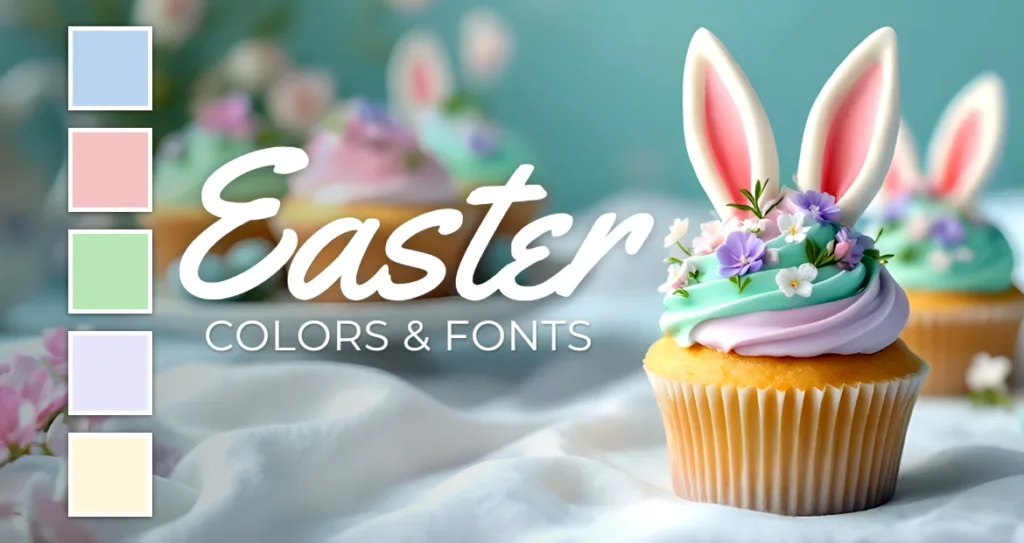
Color plays a key role in evoking emotion, and Easter’s color palette symbolizes renewal, hope, and joy. Traditional pastels like soft pink, baby blue, mint green, and lavender remain classic choices for Easter designs.
Modern Easter palettes often pair these soft pastels with unexpected accents. Consider sage green with coral, dusty rose with gold, or soft blue with warm cream. These combinations add sophistication while preserving the hopeful spirit of Easter.
Earth-inspired colors also reflect our growing connection to nature and sustainability. Think of the deep purple of crocuses, the warm yellow of daffodils, and the fresh green of new grass. These natural tones create Easter cards that feel authentic and grounded.
When it comes to typography, modern calligraphy fonts like “Sacramento” or “Great Vibes” offer personality without sacrificing legibility. Pair these with clean, sans-serif fonts like “Montserrat” or “Nunito” for the body text, ensuring a natural flow and easy readability.
Why First-Time Creators Love Making Easter Cards with Pixlr’s Nano Banana
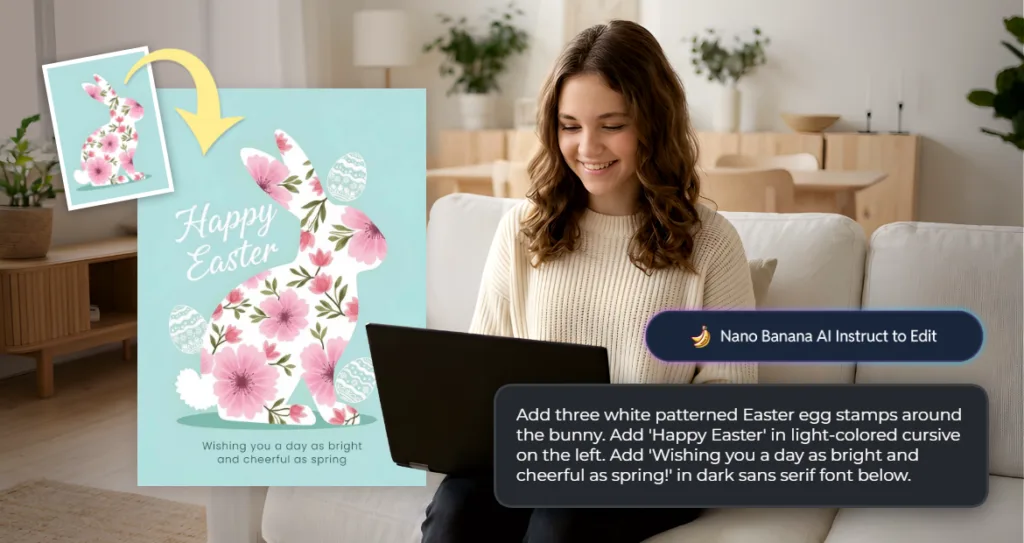
Pixlr’s Nano Banana feature is a game-changer for first-time greeting card creators. It removes the intimidation of digital design by offering simple, contextual guidance through text prompts. No technical knowledge is required. Nano Banana stands out for its ability to understand creative intent through natural language. Simply describe your vision, and the AI brings it to life. For example, using a previously generated Easter image, you might prompt:
“Add three white patterned Easter egg stamps around the bunny. Add ‘Happy Easter’ in light-colored cursive on the left. Add ‘Wishing you a day as bright and cheerful as spring!’ in dark sans serif font below.”
Nano Banana offers smart suggestions as you design. If you add a pastel background, it may recommend text colors that pop. Include Easter imagery, and it suggests complementary elements that enhance your design. This real-time guidance helps users build confidence while learning design principles.
First-time creators appreciate Nano Banana’s ability to prevent common mistakes. It helps steer users away from poor color choices, unreadable text, or unbalanced compositions, making the design process enjoyable and stress-free.
Easter Greeting Card Design Tips for First-Time Creators
Creating your first Easter greeting card should be a fun and enjoyable experience. Start with confidence, knowing that your personal touch, no matter how simple, makes any card more meaningful than a store-bought option.
Start with a Clear Emotional Intention
Are you designing something playful for children, elegant for adults, or heartfelt for family? Define your emotional direction to guide every design choice, ensuring your card feels cohesive and purposeful.
Embrace the Power of White Space
Empty space is important. It allows key elements to breathe and creates visual rest areas, making your card more pleasant to view and balanced.
Consider Your Greeting Card’s Medium
Will your Easter card be printed, handed out in person, or shared digitally? This affects everything from text size (smaller for digital, larger for print) to color choices. What looks bright on screen may print differently.
Test Your Design
Regularly check your design at actual size. Conduct a test print to ensure everything is readable and well-proportioned. Pixlr allows you to zoom in to see how your card will appear at its final size.
Trust Your Creative Instincts
Above all, trust your instincts. If something feels right to you emotionally, whether it’s a color combination, a font choice, or a photo, it’s likely the right decision for your card. Your genuine creative instincts, paired with Pixlr’s AI tools, will help you create beautiful Easter greeting cards that truly connect with your recipients.
Create Your Own Easter Greeting Card in Minutes with Pixlr
This Easter, let Pixlr help you create more than just a card. It’s an opportunity to send a heartfelt message that shows your care and creativity. With Pixlr’s intuitive design tools, you can personalize every detail to ensure your Easter greeting is as unique as the people you’re sending it to. Forget the generic store-bought cards and make this Easter truly special with something personal, meaningful, and made by you.