

That perfect spring moment with its golden sunlight, vibrant blooms, and joyful moments, but what happens when your photos fail to capture the beauty you experienced? Don’t worry! Pixlr’s AI-powered editing tools provide a fast, easy way to enhance your spring photos without requiring advanced editing skills. Whether you’re a beginner or an experienced editor, Pixlr Express helps bring your spring photos to life with just a few simple clicks.
Spring light is beautiful but tricky. Cloudy days mute colors, bright sunlight washes out the skies, and mixed lighting can make everything look off. The result? Photos that feel dull, even when the moment was full of joy. The good news is you don’t have to settle for those shots. Pixlr Express features smart AI tools that handle the hard work for you. No sliders to master, no layers to manage, just open your photo, tap a button, and watch it come alive.
Why Spring Photos Look Dull and How to Fix Them Fast with AI
We love spring for its soft, diffused light, but this lighting often causes challenges for photographers. The subtle glow can make photos appear flat, while harsh midday sun results in overexposed highlights and dark shadows. Mixed lighting, such as shooting near windows, can add unnatural color casts to your photos.In the past, professional editors would spend a long time adjusting curves, exposure, and white balance to correct these issues. But with Pixlr Express, you can easily fix your spring photos with just one tap. The Auto Enhance feature quickly rebalances exposure, contrast, and color to create a natural, vibrant look. For more precision, the Shadows and Highlights sliders, along with Vibrance and Temperature controls, allow for detailed adjustments. Pixlr Express makes photo editing fast, easy, and effective.
5 No-Fuss Spring Photo Fixes You Can Do in Pixlr Express
Not every photo needs advanced editing, especially when you’re just looking to brighten up your spring memories. Pixlr Express offers easy-to-use AI-powered tools that help you enhance your photos in no time. Whether you want to fix underexposed shots or add some extra vibrance, these simple tools make it possible to achieve professional results in minutes. Here are five simple fixes you can apply in under a minute to enhance your spring photos:
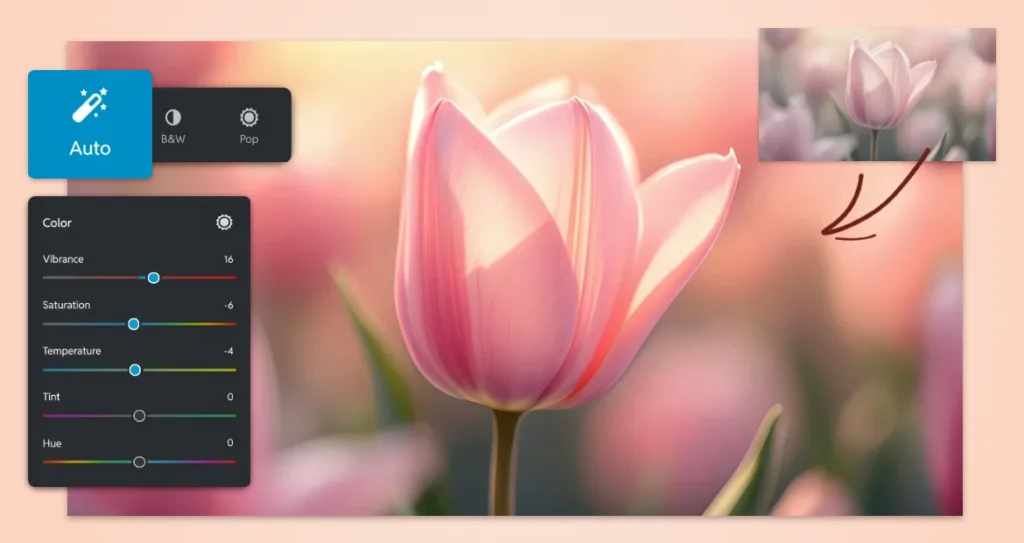
1. One-Click Magic: Use “Auto Adjust”
Spring photos often need a little extra polish, especially when they turn out underexposed or have inaccurate colors due to changing light conditions. Pixlr Express’s Auto Adjust feature is the perfect tool to fix these issues with minimal effort. Instead of manually adjusting each photo for exposure, contrast, and color tones, simply tap the ‘Auto’ button under ‘Adjust’. This tool automatically corrects the exposure, contrast, and color balance, making your photo look natural, vibrant, and professionally polished in just one click. It’s the ideal solution for quickly fixing those photos that didn’t turn out quite right.
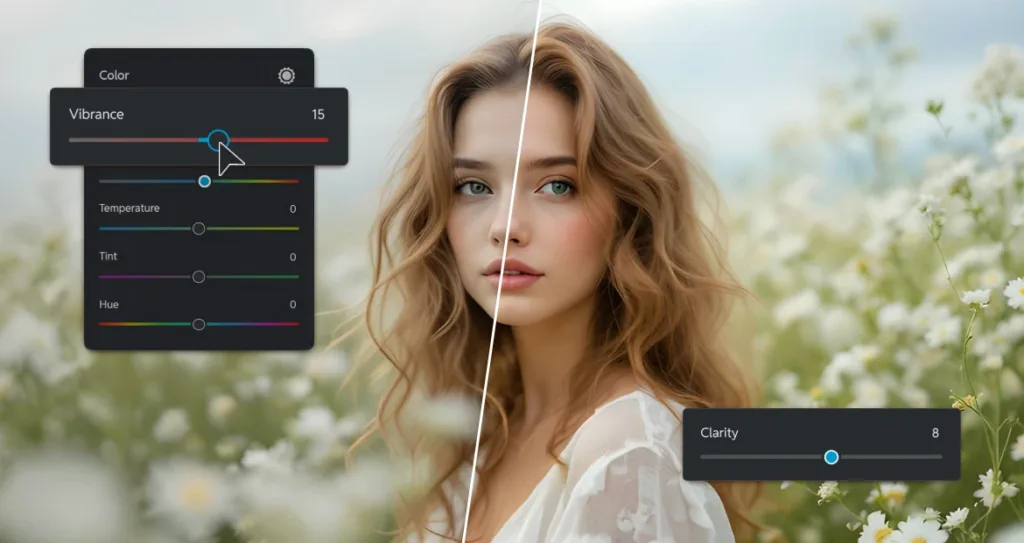
2. Bring Life Back to Washed-Out Skies
Overcast days bring a soft, diffused light, which is ideal for portraits but often leaves skies looking washed out and colorless. If you find yourself with a dull, gray sky in your spring photos, you can restore vibrancy and contrast by adjusting the Vibrance slider. This tool boosts muted tones like pale blues and greens, while preserving the natural hues in skin tones, flowers, and other vibrant areas. It’s a quick way to make the sky appear more lively and the foliage look fresh again. To further enhance the sky’s texture, add a touch of Clarity to the image. This subtly increases midtone contrast and recovers delicate details like clouds and tree leaves, making the entire photo feel more dynamic and realistic.
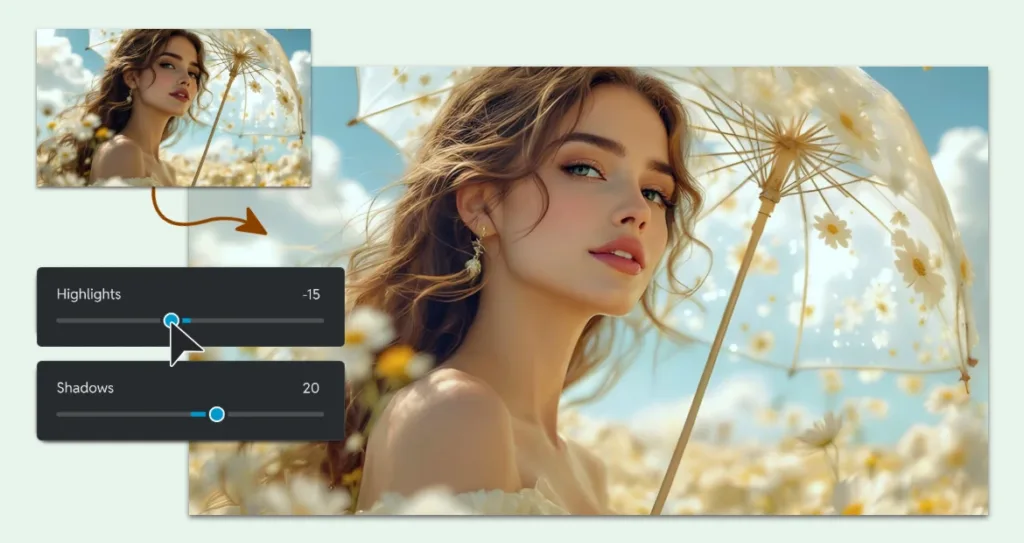
3. Brighten Dark Areas Without Losing Highlight Detail
Spring photos often feature scenes with uneven lighting, like portraits taken in the shade or close-ups of flowers in the shadows. You can brighten up these dark areas without overexposing the rest of the image by using the Shadows/Highlights sliders in ‘Adjust’ panel. First, increase the ‘Shadows’ to lighten dark areas, such as the shaded parts of a face or the underexposed parts of your photo. Then, slightly reduce the ‘Highlights’ to recover details in overexposed areas, like bright skies or sunlit petals. This method ensures you don’t sacrifice any important details while brightening dark areas. It’s perfect for backlit portraits, golden hour shots, and close-ups of flowers or objects in dim lighting.
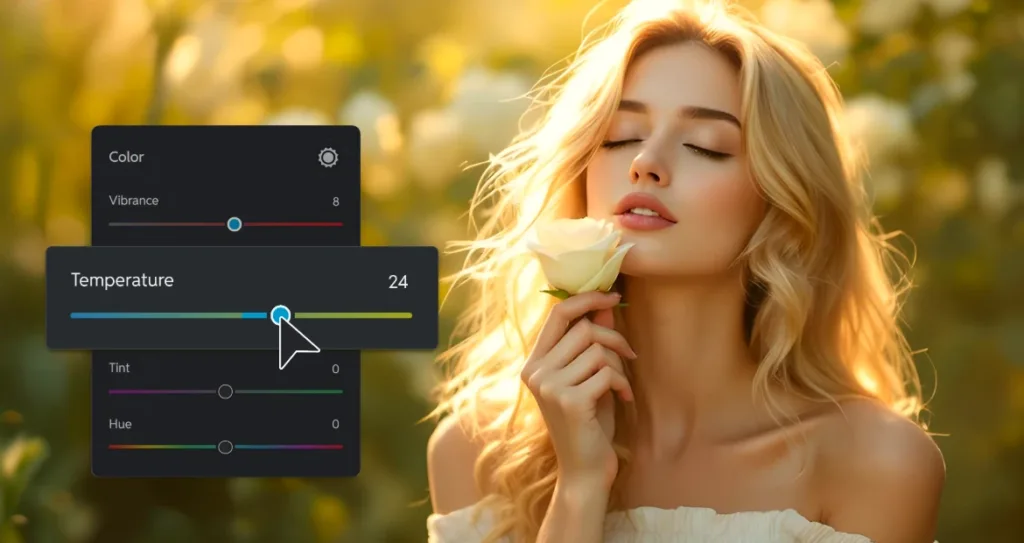
4. Add Warmth for a Sun-Kissed Feel
Spring light can sometimes look cool or flat, especially during early mornings or late afternoons, even though the moment may have felt warm and inviting. To restore the golden, sun-kissed glow to your photos, use the ‘Temperature’ slider found at the ‘Adjust’ panel in Pixlr Express. This tool allows you to shift the color temperature toward the warmer side, adding a subtle but noticeable golden hue to your images. A small adjustment, typically between +20 and +30, can replicate the natural warmth of sunlight without going overboard and turning the image orange. With Pixlr’s live preview, you can see the results in real-time, ensuring your photo looks just the way you want it.

5. Refresh Soft Greens & Pastels
Spring is all about delicate pastels and fresh, soft greens. However, phone cameras often capture these colors as muted or washed-out, especially in bright sunlight. Instead of applying a general saturation boost to the entire image (which may lead to oversaturation), use the HDR feature found in the ‘Filter’panel under Pixlr Express to adjust specific colors in your photo. Increase the amount or contrast to automatically enhance the dark areas of the image. To make your photos stand out, click on ‘Pop’at the top of the‘Adjust’ panel. This automatically adjusts the Greens, making grassy fields, leaves, and trees pop with vibrancy. You can also boost the Pinks or Yellows to bring back the delicate hues of flowers, springtime clothing, or other pastel-colored elements. This selective enhancement ensures that your spring colors come to life without overwhelming the rest of the image, giving your photo a fresh, natural feel.
These five quick fixes, powered by Pixlr Express’s tools and features, allow you to enhance your spring photos in seconds. No need for complex adjustments or complicated software, just simple, effective solutions to bring out the best in your memories. Whether you’re a seasoned editor or just starting, Pixlr Express offers the perfect combination of power and simplicity to make your spring photos shine.
Add Spring Mood with Subtle AI-Powered Effects
Great spring photos are not just about achieving correct exposure; they are about creating the right atmosphere. A touch of dreaminess, softness, or seasonal styling can turn an ordinary snapshot into a heartfelt memory. The key is to keep it subtle. Spring is light, airy, and full of quiet beauty, so your edits should reflect that spirit as well.
Start with a soft glow. In the Effects menu, try the ‘Punch’ effect at just 25 to 35 percent. This adds a warm, soft glow around highlights, making it perfect for backlit petals, sunlit hair, or morning dew on leaves. If you want to add a vignette, click on ‘Adjust’ and find the ‘Scene’ section, where you can use the slider to add vignette automatically. Vignette creates a luminance effect that gives your image an ethereal feel without losing sharpness.
Next, simplify busy backgrounds. If your subject—like a child with flowers, a coffee cup on a garden table, or a pet in the park—gets lost in visual clutter, use the AI Cutout tool. With just one click, it isolates your subject cleanly. Then, instead of leaving the background white, add a soft pastel overlay, such as pale mint, blush, or sky blue, from the background options. This creates a calm, editorial look that feels intentional and seasonal.
Finally, explore seasonal presets but use them wisely. Pixlr Express includes curated filter packs under ‘Effects’, like ‘Nature Collection,’ ‘Portrait Collection,’ or ‘Instage Collection,’ which feature a variety of filters designed with spring in mind. Instead of applying these at full strength, lower the intensity to 30 to 50 percent. This allows you to capture the mood of spring gently, with a nice warm contrast, without overwhelming the original photo.
Remember, the most powerful spring edits are the ones viewers don’t recognize as “edited.” They simply feel right. With Pixlr’s AI-powered effects, you can achieve that natural, balanced look in seconds—without needing to use masking, layers, or guesswork.

BONUS: Edit Spring Photos On-the-Go with Pixlr Mobile
Pixlr isn’t just for desktop use. It works perfectly on mobile devices as well, making it the perfect tool for editing your spring photos anytime, anywhere. Whether you’re out capturing the beauty of a blooming garden, taking a stroll through a park, or snapping shots of a colorful flower market, Pixlr AI Photo Editor app available on Android or IOS allows users to enhance photos right from your phone or tablet.
With Pixlr AI Photo Editor, you can use tools like ‘Autofix’ or manually adjust the photo through ‘Adjustment’ to enhance the overall photo.Add filter ‘Effects’, ‘Overlay’ or ‘Stylize’ with under Effects easily with just a click or use AI tools like ‘Remove background’, ‘Generative expand’, ‘Remove object’ and many other features directly on your phone, without needing to download any apps. You can easily adjust exposure, contrast, and colors, brighten up dark areas, restore vibrant hues, and remove distractions—all with just a few taps.
Whether you’re traveling, attending an outdoor event, or simply enjoying a spring day outdoors, Pixlr AI Photo Editor app lets you take control of your photo editing process on the go. The convenience of mobile editing means you can polish your spring photos immediately after taking them, without having to wait until you’re back at your desktop. This ensures you can preserve the mood and feeling of the moment while the inspiration is still fresh in your mind.
Pro Tip: For the best results, try editing your photos immediately after taking them while the memories are still fresh. You can quickly adjust lighting, colors, and contrast to make your photos look their best and share them with friends and family without delay.
Edit Your Spring Photos in Seconds with Pixlr Express
Don’t let dull spring photos bring you down. Pixlr’s AI-powered tools in Pixlr Express help you bring your memories to life quickly and easily. Whether you’re editing a family picnic, a garden walk, or a spring festival, Pixlr Express provides everything you need to enhance your images without the hassle of complex software.
But the editing doesn’t stop there! You can also enhance your spring photos on the go with the Pixlr AI Photo Editor app. Available for both Android and iOS, this app allows you to access powerful AI tools right from your phone or tablet, making it perfect for editing your photos wherever you are.
Start editing your spring photos today with Pixlr Express or the Pixlr AI Photo Editor app and experience the power of AI-driven photo editing across all your devices.