Viral Visuals: “AI Camera Tracking Image” – Turn Your Photo Into a Cinematic Surveillance Scene

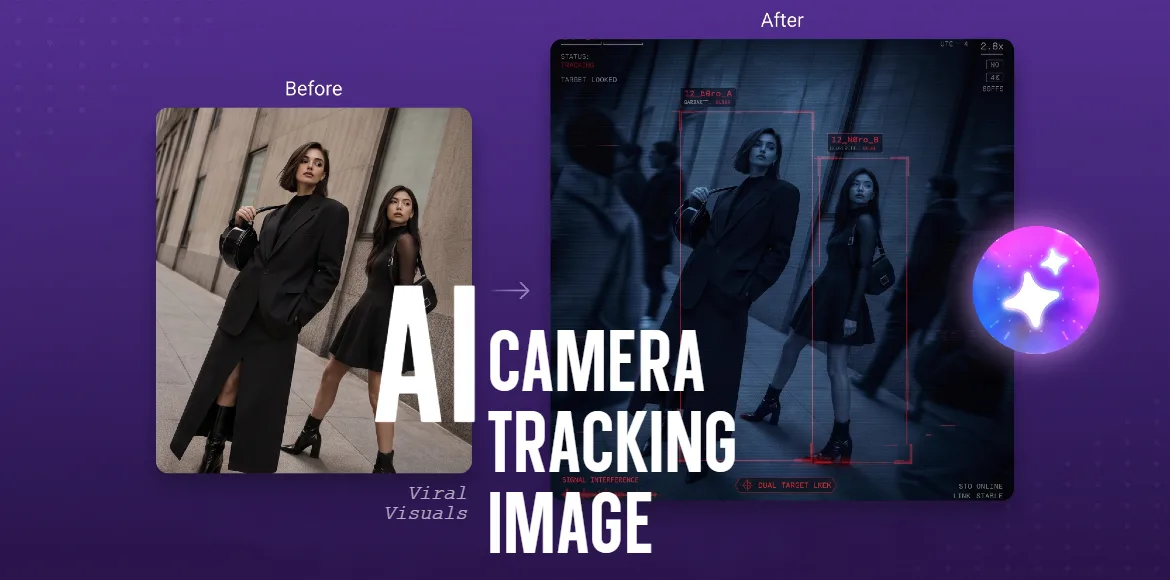
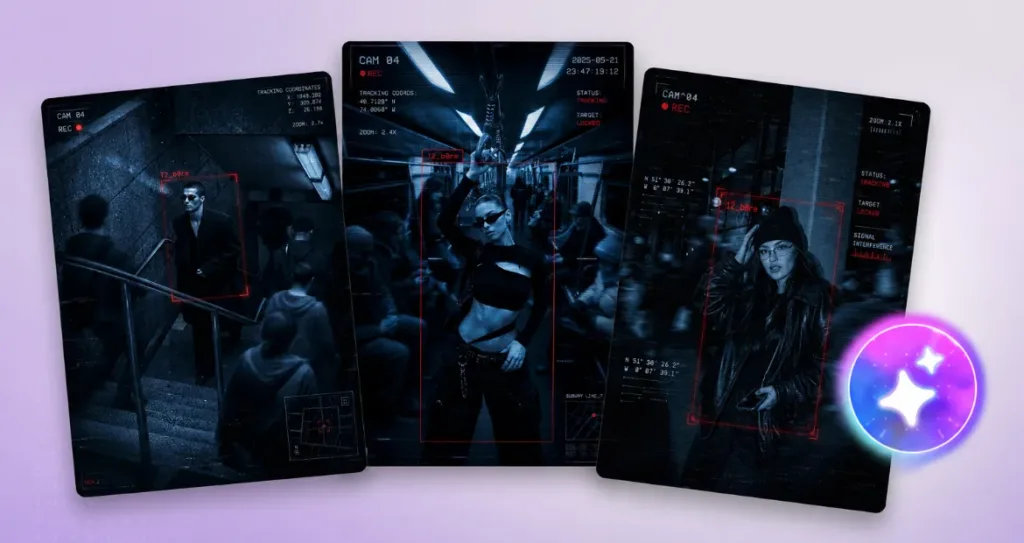
A tense blue CCTV color grade, deep shadows, and a sharp red tracking box locked directly onto you while blurred figures rush past in the background. That is the AI Camera Tracking Image trend. It elevates a standard photo into a high-stakes, breathless frame from a spy thriller or a heist movie. By pairing rigid static generation with targeted motion effects, creators are turning their casual outfits into cinematic found footage.
What is the AI Camera Tracking Image trend?
Three beats:
- The Target: Your uploaded photo, with your identity, outfit, and facial features perfectly preserved as the focal point.
- The UI Overlay: Realistic scanner graphics, a tracking box, a timestamp, and REC icons that frame the scene.
- The Drag-Shutter Blur: A motion effect that freezes you completely while applying a slow-shutter motion blur to the surrounding pedestrians or traffic.
In one sentence: Turn your photo into an intense, moving surveillance capture where the world rushes by, but you remain perfectly locked in focus.
Why it works
- The contrast forces a pause. The juxtaposition of absolute stillness against chaotic environmental motion is a proven algorithmic retention mechanism that forces viewers to stop scrolling.
- The interface tells a story. Adding digital UI elements—like tracking coordinates and system statuses—instantaneously makes the visual feel heavily art-directed, immersive, and designed on purpose.
- High drama, low effort. It provides a cinematic, suspenseful narrative without requiring physical video shoots, expensive camera equipment, or complex set design.
How to make it in Pixlr
Step 1: Build the Surveillance Scene
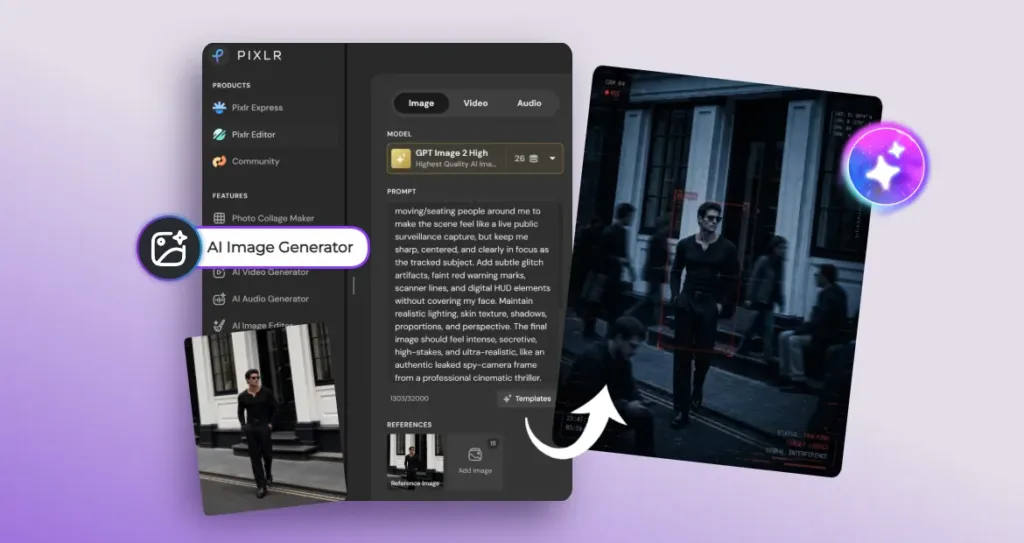
Upload your original photo to Pixlr’s AI Image Generator. Select your preferred AI model, and type in the following prompt to build the base image:
“Use my uploaded photo as the base image and preserve my identity clearly. Keep my exact face, hairstyle, outfit, body proportions, pose, and the overall background structure recognizable. Transform the image into a dramatic cinematic surveillance / spy-camera scene, like a tense frame from a thriller movie. Apply a realistic blue monochrome CCTV color grade with deep shadows, harsh contrast, subtle scanlines, digital noise, film grain, slight motion blur, and a cold night-vision surveillance mood. Place a sharp red tracking box around me, with futuristic scanner UI graphics and active surveillance overlays, including: • CAM 04 • REC icon • Tracking coordinates • Zoom indicator • Timestamp • STATUS: TRACKING • TARGET LOCKED • SIGNAL INTERFERENCE. Add blurred moving/seating people around me to make the scene feel like a live public surveillance capture, but keep me sharp, centered, and clearly in focus as the tracked subject. Add subtle glitch artifacts, faint red warning marks, scanner lines, and digital HUD elements without covering my face. Maintain realistic lighting, skin texture, shadows, proportions, and perspective. The final image should feel intense, secretive, high-stakes, and ultra-realistic, like an authentic leaked spy-camera frame from a professional cinematic thriller.”
Step 2: Iterate and Refine
Generate a few variations. The key to professional AI rendering is iterative refinement. Ensure the glitch artifacts and HUD elements do not cover your face, and that the blue monochrome grade feels cinematic rather than overly saturated.
Step 3: Animate the Camera Tracking
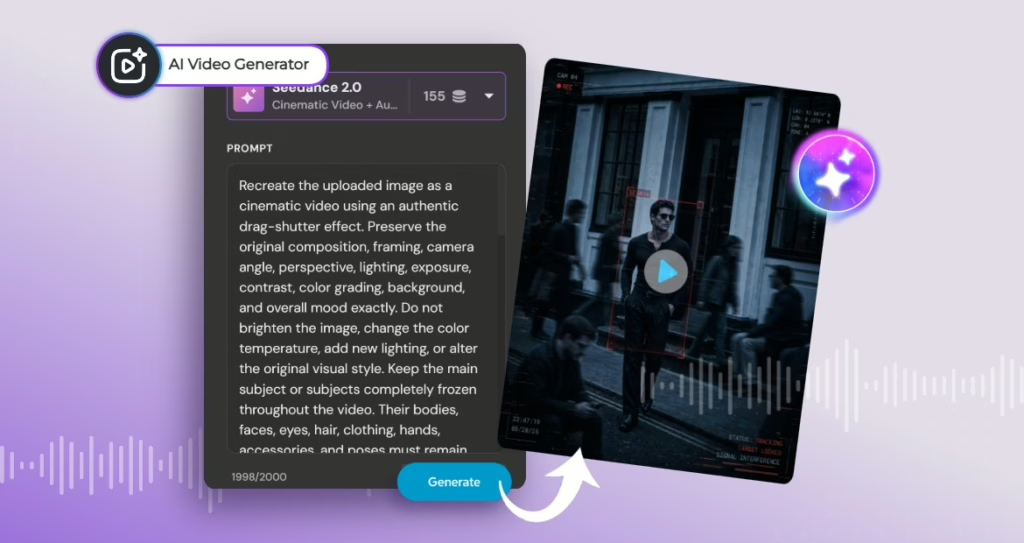
To animate the scene and bring the surveillance camera to life, upload your newly generated image into Pixlr’s Video Generator. Use the following prompt to lock yourself in place while the background moves:
“Recreate the uploaded image as a cinematic video using an authentic drag-shutter effect. Preserve the original composition, framing, camera angle, perspective, lighting, exposure, contrast, colour grading, background, and overall mood exactly. Do not brighten the image, change the colour temperature, add new lighting, or alter the original visual style. Keep the main subject or subjects completely frozen throughout the video. Their bodies, faces, eyes, hair, clothing, hands, accessories, and poses must remain perfectly still and razor sharp in every frame. Do not add blinking, breathing, facial movement, hair movement, fabric movement, pose changes, or motion blur to the main subject. Apply the drag-shutter effect only to surrounding people, vehicles, objects, or environmental elements that are meant to move. Their movement should create realistic directional motion blur, transparent ghosting, and natural long-exposure trails similar to footage captured at approximately 1/8 to 1/15 second shutter speed. Each trail must follow the true movement direction while preserving realistic anatomy, proportions, depth, and perspective. Avoid AI smearing, melting details, duplicated limbs, warped bodies, unnatural streaks, or frame-interpolation artifacts. Keep all visible text, logos, typography, interface graphics, tracking boxes, labels, icons, numbers, borders, and decorative elements completely unchanged and pixel-locked to the frame. Do not regenerate, rewrite, animate, blur, distort, crop, flicker, move, resize, recolour, or obscure any graphic element. Keep the camera almost completely locked. Use only an extremely subtle push-in when necessary. Do not add noticeable handheld shake, panning, tilting, zoom jumps, reframing, or focus hunting. The final result should feel like a premium cinematic editorial captured with a real slow drag-shutter technique, where the main subject remains perfectly frozen while the surrounding world moves around them. Ultra-photorealistic, physically accurate motion blur, stable lighting, preserved details, realistic optical rendering, and no AI artifacts.”
Variations worth trying
- The Night Vision Edit. Swap the blue monochrome in your prompt for a stark, glowing green night-vision aesthetic to lean into military-style found footage.
- The Cyberpunk Bounty. Change the UI elements to neon holographic text to make it look like a futuristic bounty hunter’s tracking visor.
- Two-Player Co-Op. Upload a photo of two people, making the tracking box target both subjects as if they were partners in a heist getting caught on the same camera.
The AI Camera Tracking Image trend is the perfect way to inject high-stakes cinematic drama into an ordinary outfit photo. By freezing yourself in time while the world races by, you create a striking visual contrast that algorithmically forces viewers to stop scrolling. Ready to turn your camera roll into an intense surveillance thriller? Head over to Pixlr’s AI Image and Video Generators to build your scene, lock your target, and watch your reality move around you.