
You spent weeks planning the perfect summer trip. You stood at the edge of a cliff overlooking turquoise water, watched the sun melt into the horizon over a golden beach, and captured what felt like the most beautiful moments of your life through your lens. Then you got home, opened your photos, and felt that familiar disappointment.
The colors looked flat. The lighting was off. A stranger wandered into the background of your favorite shot. That magical moment you wanted to hold onto forever looked nothing like what you actually saw and felt in person.
Sound familiar? You are not alone. This is one of the most common frustrations for beginner travel photographers, and the good news is that it has nothing to do with your camera or your eye for a great shot. It comes down to one thing: editing.
Even the most stunning travel photos in the world go through editing before they are shared. The difference between a forgettable snapshot and a jaw-dropping travel image is not always where you stood or what camera you used. It is what happened after the shot was taken.
In this guide, you will discover 5 beginner-friendly photo editing tips that will completely transform your summer travel shots. Every tip uses Pixlr Express, a free online photo editor designed specifically for speed, simplicity, and stunning results with no technical experience required.
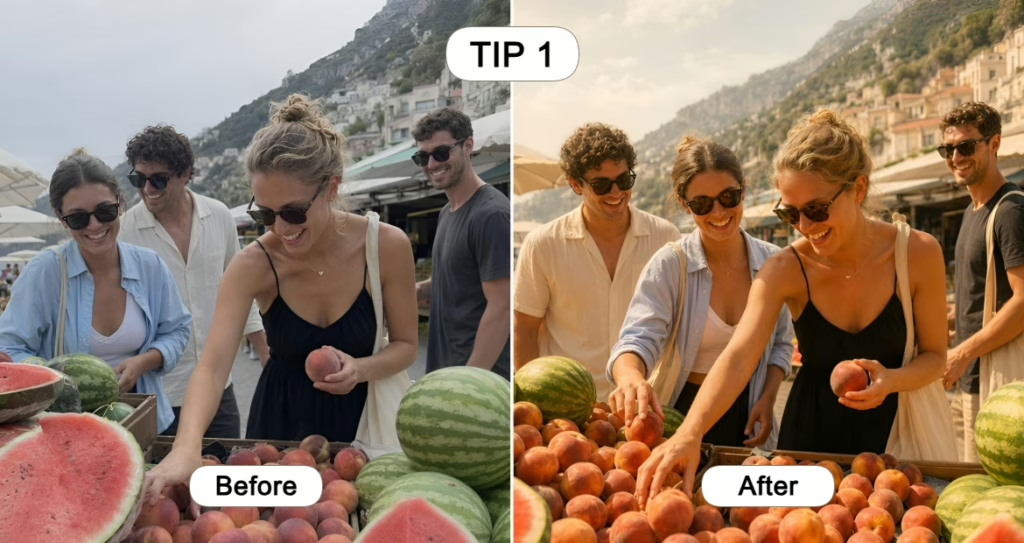
Instantly Warm Up Flat or Dull Summer Photos with One-Click Effect
Picture this. You spent the morning at a beautiful coastal market, the kind with colorful stalls, fresh flowers, and locals going about their day. The atmosphere was vibrant and alive. But when you look at your photos later, they feel cold, grey, and lifeless. The magic simply did not translate.
This is one of the most common beginner travel photo problems, and it happens because cameras often struggle to capture the warmth and energy that your eyes naturally perceive. The colors your brain registered in that moment were richer, warmer, and more saturated than what the lens recorded.
The fix is simpler than you think.
How to Apply Effects in Pixlr Express to Enhance Your Travel Photos
Pixlr Express has a built-in Effects panel packed with preset looks designed to transform the mood and tone of any photo instantly. There are no color theory to understand, and no technical settings to figure out. You browse the presets and click the one that feels right. Want your beach photo to feel warm and golden? One click. Want that market shot to feel vibrant and Instagrammable? One click. Want a moody, cinematic look for your mountain scenery? One click.
The Effects library covers a wide range of styles, from sun-drenched warmth to cool coastal tones to rich, editorial looks that make your travel shots feel professionally shot and styled.
Which Effects Work Best for Summer Travel Photography
For summer travel photos specifically, look for effects that lean into warmth, brightness, and vibrancy. Presets that boost golden tones work beautifully for outdoor shots taken during daylight. Cooler, more muted presets complement ocean and poolside photography. Richer, more saturated effects bring street scenes and markets to life.
The best approach is to try several back to back on the same photo. Because it is just one click each time, there is no commitment and no risk. You will know the right one when you see it.
Pro tip: Apply the same Effect preset across a series of photos from the same trip to create a cohesive, curated look for your Instagram feed or travel album.
Tip 2
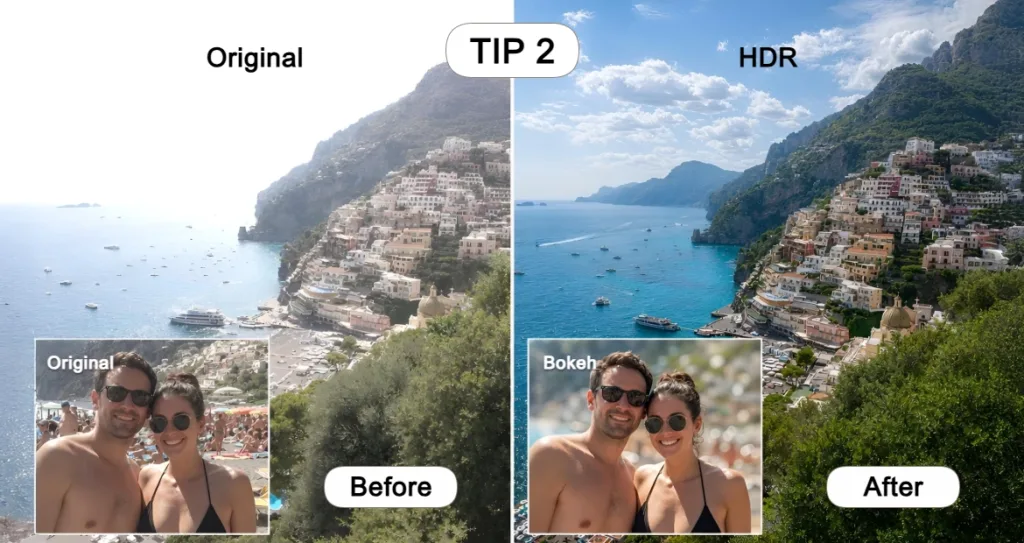
Make Your Summer Photos Pop with HDR and Add Depth with Bokeh Filters
Great travel photography is about more than just accurate colors. It is about dimension, atmosphere, and depth. It is what separates a photo that makes someone stop scrolling from one they scroll straight past. Two of the most powerful tools for achieving this in Pixlr Express are HDR and Bokeh, both found in the Filters panel and both achievable with a single click.
How to Use HDR to Make Dull Travel Photos Look Vivid and Professional
DR stands for High Dynamic Range, and it is the secret behind those travel photos that look almost too beautiful to be real. Rich shadows, luminous highlights, vibrant colors, and incredible depth all come together in a way that makes the image feel three-dimensional.
In traditional editing, achieving an HDR look requires significant technical knowledge and multiple manual adjustments. In Pixlr Express, it takes one click. Open the Filters panel, select HDR, and watch your flat travel photo instantly transform into something that looks like it belongs in a travel magazine. It works especially well on landscapes, cityscapes, and any outdoor shot where you want the scenery to feel dramatic and alive.
How to Add a Bokeh Effect to Your Summer Photos for a Dreamy, Professional Look
Bokeh is that beautiful, blurred background effect you see in professional photography where the subject is sharp and the background melts into soft, dreamy circles of light. It is one of the most sought-after effects in portrait and lifestyle photography, and it used to require an expensive camera with a wide-aperture lens to achieve.
With Pixlr Express, any beginner can add a stunning bokeh effect to any photo in seconds. Select Focus or Bokeh from the Filters panel, then simply mark the area of your photo you want to keep sharp. Pixlr Express automatically blurs everything else, creating a natural-looking depth-of-field effect instantly. No masking, no manual selection tools, no technical skill required.
What makes Pixlr Express’s bokeh tool even more special is the ability to customize the shape of the bokeh itself. Switch from the classic round bokeh to square or even heart-shaped bokeh for a more creative and personal touch.
Pro tip: Heart-shaped bokeh works beautifully for couple shots, honeymoon travel photos, and any romantic summer scene where you want to add an extra layer of warmth and personality.
Tip 3
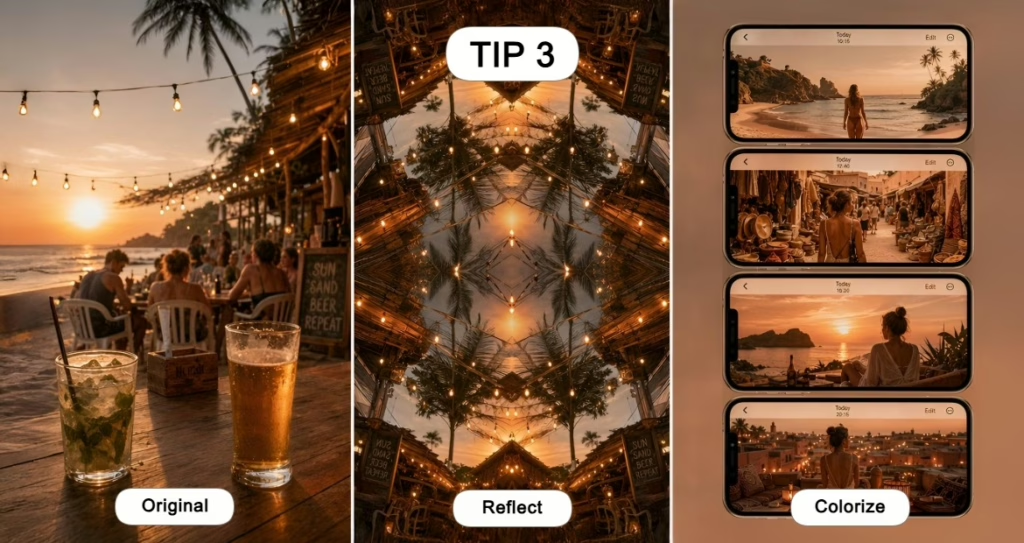
Create Scroll-Stopping Summer Visuals with Reflect and Colorize
Once your photos look warm, vivid, and sharp, the next level is creativity. This is where you go from a great photo to a truly original visual that stops people mid-scroll and makes them want to share it.
Pixlr Express has two creative tools that are perfect for this: Reflect and Colorize.
How to Use Reflect to Turn Any Summer Shot into a Striking Visual Pattern
Reflect is one of those tools that feels almost magical the first time you use it. It takes any photo and creates a symmetrical reflection of it, instantly transforming an ordinary summer scene into a striking, kaleidoscopic visual pattern.
A simple beach shot becomes a stunning symmetrical composition. A photo of palm trees becomes a bold, graphic pattern. A colorful market scene becomes an eye-catching abstract image that looks like it was created by a professional designer.
It is one click, zero effort, and the results are consistently impressive. For social media content, Reflect-edited photos tend to perform significantly better than standard shots because they are visually unexpected and immediately arresting.
How to Use Colorize to Build Your Own Summer Color Palette
Every great travel Instagram feed has one thing in common: a consistent color palette. It is what makes a collection of photos feel cohesive, intentional, and visually satisfying rather than random and disjointed.
Colorize in Pixlr Express lets you shift and stylize the entire color mood of your photo to match whatever palette feels right for your summer aesthetic. Want a warm, golden Santorini palette? Done. A cool, aqua-toned Maldives palette? Easy. A vibrant, tropical palette bursting with color? One click away.
Applied consistently across your travel photos, Colorize becomes one of the most powerful tools for building a summer feed that feels curated, beautiful, and entirely your own.
Pro tip: Pick your favorite Colorize palette and apply it to every photo from a specific trip. Your travel album will look like it was shot by a professional with a signature editing style.
Tip 4
Use AI Tools to Add, Change, or Remove Anything in Your Summer Photos
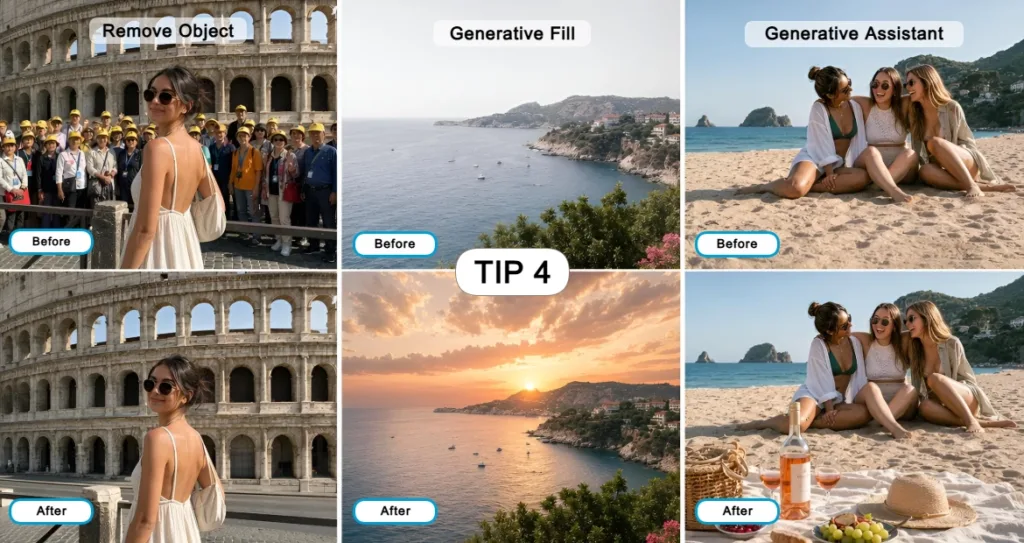
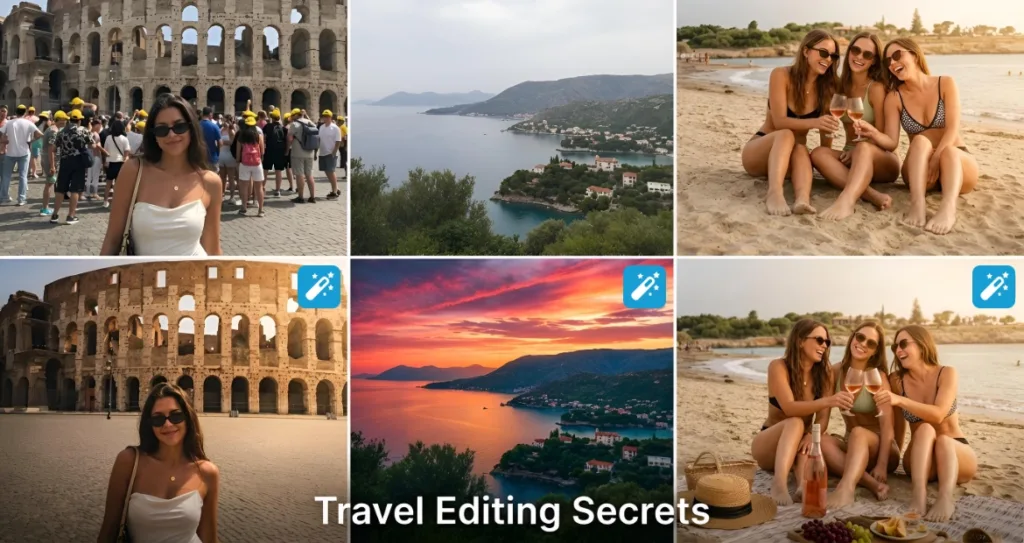
Here is the honest truth about summer travel photography: no matter how carefully you frame a shot, something almost always gets in the way. A stranger walks into the background at the worst possible moment. The sky is flat and grey when you needed blue and dramatic. The composition is almost perfect but something is missing from the foreground.
These used to be unfixable problems for beginner photographers. Not anymore. Pixlr Express brings professional-level AI editing tools to complete beginners, with no technical knowledge required and results that are genuinely impressive.
Add Missing Elements to Your Summer Photos with Generative Assistant
Generative Assistant is Pixlr Express’s AI-powered content creation tool. It lets you add entirely new elements to your photos simply by describing what you want in plain language.
Want to add a sailboat to the horizon of your ocean shot? Type it. Want to add dramatic storm clouds to a flat grey sky? Describe it. Want to place a colorful hot air balloon in the background of your landscape photo? Just tell the AI what you have in mind.
The AI reads your prompt and places the new element naturally and realistically into your existing photo within seconds. The results blend seamlessly with the original image, making additions look like they were always part of the scene.
Change Specific Parts of Your Photo Precisely with Generative Fill
Generative Fill takes AI editing one step further by giving you precise control over exactly which part of your photo you want to change or enhance.
Instead of prompting the AI to add something to the overall scene, you mark a specific area of your photo and then describe what you want the AI to replace it with. Mark a dull sky and prompt the AI to replace it with a golden sunset. Mark a plain wall behind your subject and replace it with a lush tropical garden. Mark an empty table in a café scene and fill it with a beautifully styled coffee and pastry.
The result is targeted, seamless, and completely convincing. For beginners who want precise creative control without technical editing skills, Generative Fill is a genuine game-changer.
Remove Photo Bombs and Distractions Instantly with Remove Object
This is the tool that every travel photographer wishes they had discovered sooner. You are standing in front of the Trevi Fountain. You wait patiently for a gap in the crowd. You get your shot. You look at it later and there is still a man in a bright red jacket standing right behind your shoulder, completely ruining the composition.
With Remove Object in Pixlr Express, you simply click on the unwanted person, object, or distraction in your photo and the AI removes it cleanly. No patching, no cloning, no technical skill required. Pixlr Express fills the removed area automatically in a way that looks completely natural. It works equally well on lamp posts, litter bins, signage, tourists, and any other element that crept into your frame uninvited.
Pro tip: Remove Object works best on backgrounds and mid-ground distractions. The cleaner and less complex the area behind the object, the more seamless the removal result will be.
Tip 5
Never Lose a Special Summer Moment to a Blurry Photo Again
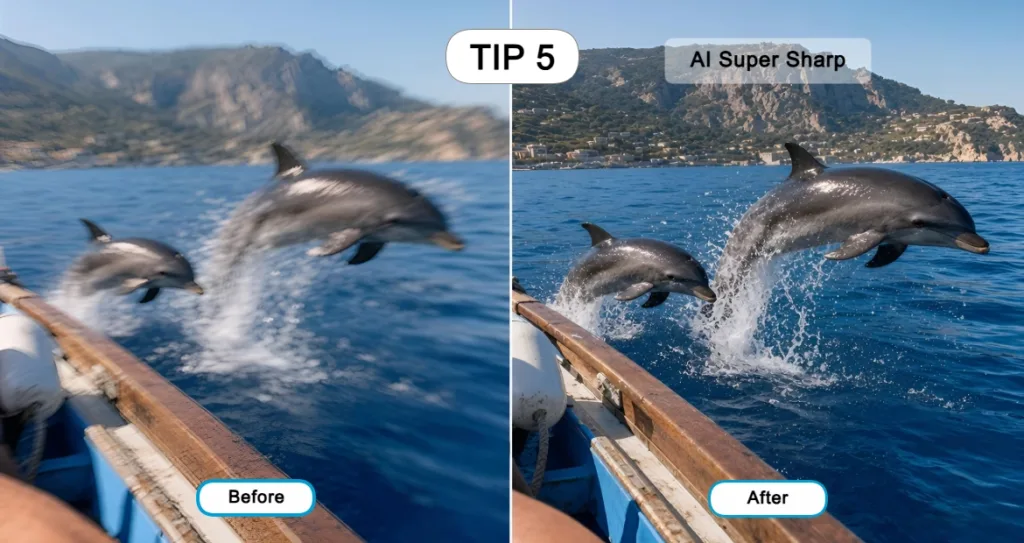
Some of the most precious travel moments are the ones you never planned for. You are on a boat in the open ocean when a pod of dolphins suddenly breaks the surface right beside you. You grab your phone as fast as you can and take the shot. Your hands are shaking with excitement, the boat is moving, and the dolphins are fast. The moment is absolutely magical.
You look at the photo and it is blurry. Not unusable. But soft enough to feel like a missed opportunity. This is exactly what Pixlr Express’s AI sharpening tools were built for.
How to Rescue Any Blurry Summer Moment with AI Super Sharp
AI Super Sharp is Pixlr Express’s one-click sharpening tool powered by artificial intelligence. It analyzes your photo and recovers detail, texture, and crispness from soft or motion-blurred shots in a way that manual sharpening tools simply cannot match.
Open AI Super Sharp, apply it with one click, and watch the details come back to life. The fur of a street cat you photographed in a Moroccan alley. The text on a vintage sign in a Lisbon backstreet. The expression on a face captured mid-laugh on a sunset boat trip.
There are no manual sliders to over-adjust and no risk of creating unnatural grain or noise. The AI handles everything, and the results are consistently impressive even on shots that initially looked beyond saving.
How to Make Any Summer Photo Bigger and Sharper with AI Super Scale
AI Super Scale takes your photo and enlarges it up to four times its original size while maintaining sharpness, detail, and quality throughout.
This is particularly valuable for travel photos taken on a phone, where the original resolution may not be high enough for large-format printing or detailed cropping. With AI Super Scale, a great phone shot taken on a spontaneous summer adventure can become a large-format print worthy of a wall in your home.
Pro tip: Use AI Super Sharp first to crisp up the detail, then apply AI Super Scale to enlarge the result. The combination gives you the sharpest, largest, and most print-ready version of any summer memory you want to keep forever.
No Matter What Summer Photo You Have, Pixlr Express Has a Fix for It
Too warm. Too cold. Too flat. Too blurry. Too crowded. Missing something. Every single summer photo challenge has a solution waiting for it inside Pixlr Express.
That is what makes it different from a standard photo filter app. It is not just about making your photos look prettier. It is about giving every image, no matter its flaws, a genuine second chance. The spontaneous shot you almost deleted. The landscape that looked flat in the camera but stunning in real life. The portrait that was almost perfect if not for one distracting element in the background.
Pixlr Express does not ask you to be a skilled editor. It does not ask you to understand color theory, master layer masks, or spend an hour on a single image. It meets you exactly where you are as a beginner and delivers results that genuinely surprise you.
Why Pixlr Express Is the Must-Have Photo Editing App for Summer 2025
- Completely free to use with no complicated setup or subscription required to get started
- One-click tools designed for beginners with zero learning curve and immediate results
- AI-powered features that deliver professional-quality edits in seconds
- Works on any device so you can edit on the go, straight from your phone or laptop, wherever summer takes you
- A solution for every photo problem from flat colors and blurry shots to unwanted distractions and missing elements
How to Save and Export Your Perfectly Edited Summer Photos from Pixlr Express
Once your edit is complete, Pixlr Express makes saving and sharing your photos effortless. Export in the optimal format and resolution for Instagram, Pinterest, or TikTok with a single click. Save a high-resolution version for printing, creating wall art, or setting as a desktop wallpaper. Your perfectly edited summer photo is ready to be shared, printed, and remembered exactly the way it deserves to be.
Why Pixlr Express Is the Perfect Photo Editing Tool for Beginners This Summer
By now you have seen what is possible. Warmer colors, dramatic depth, creative reflections, AI-powered additions and removals, rescued blurry moments, and upscaled prints. All of it achievable by a complete beginner with no design background and no prior editing experience.
That is the promise of Pixlr Express, and it delivers on it every single time.
What Is Pixlr Express and Who Is It For
Pixlr Express is a free online photo editor built specifically for speed, simplicity, and quality. It is designed for people who want their photos to look great without spending hours learning complicated software. Whether you are a casual traveler who wants their summer photos to do justice to the memories, a content creator building a beautiful social media feed, or a beginner photographer looking to take their shots to the next level, Pixlr Express was built with you in mind.
Why Beginners Love Pixlr Express for Editing Travel Photos
The biggest barrier most beginners face with photo editing is the fear of getting it wrong. Pixlr Express removes that fear completely. Every tool is designed to be intuitive, every result is immediate, and every edit is reversible. You can experiment freely, try different looks, and undo anything that does not feel right. There is no pressure, no steep learning curve, and no expensive software to purchase. Just fast, beautiful results that make your summer photos look exactly the way you always wanted them to.
Your Best Summer Photos Are Just Five Edits Away
Your summer travels deserve to be remembered the way they actually felt. Vivid, warm, sharp, and full of life. Not flat, blurry, or cluttered with distractions that were never part of the story.
With these five beginner photo editing tips and Pixlr Express by your side, every photo you take this summer has the potential to become something truly special. One-click Effects to bring warmth and life to dull shots. HDR and Bokeh Filters to add depth and drama. Reflect and Colorize to create visuals that stop the scroll. AI tools to add, change, or remove anything standing between you and the perfect image. And AI Super Sharp to rescue the moments that happened too fast to frame perfectly.
The edits are simple. The results are stunning. And the memories you create this summer deserve nothing less.
Open Pixlr Express today, upload your first summer photo, and see the difference for yourself. Your best travel photos are waiting.