
Digital art is any creative work made or presented using digital technology. Unlike traditional media, it lives in pixels, so you can edit, remix, and restyle it repeatedly into completely new visual directions. That being said, it still takes hours of editing, illustration, layering, masking, and texture work.
Now, with the Pixlr AI Image Generator, you can turn a simple photo or idea into a styled visual statement in just a few words. Choose a photo, or think of a subject you have in mind, then experiment with different aesthetics without creating from scratch. No advanced design skills needed.
The key is learning how to describe the style you want.
Find The Right AI Art Style For Your Creative Project
Choosing the right AI art style can instantly change how your digital artwork looks and feels. Think of it as a creative style switch, where one prompt can turn the same idea into different visual styles.
With Pixlr AI Image Generator, you can explore multiple AI digital art styles in minutes. Try different looks, compare the results, and choose the style that fits your mood, brand, or campaign. All you need is a clear subject and a few descriptive style words.
The tutorial below shows you how to guide Pixlr AI toward specific looks, moods, and creative outcomes.
How to Create Digital Art With Pixlr AI Image Generator
Step 1: Write Your Prompt
Open Pixlr’s AI Image Generator and choose the AI model that fits your project.
You can create a new visual from a description or upload an existing photo to restyle. It can be a portrait, product shot, landscape, fashion photo, pet image, or any visual you want. If you use a reference, choose an image with a clear subject and strong lighting.
Then, describe the visual details that matter most clearly.
- Subject: Who or what is the image about?
- Setting: Where does the scene happen?
- Style: What digital art look do you want?
- Mood: Should it feel dreamy, dramatic, playful, futuristic, cozy, or bold?
- Lighting: Soft sunrise, neon glow, cinematic shadows, studio lighting?
- Colors: Pastel, monochrome, neon, earthy, high contrast?
- Composition: Close-up portrait, full-body shot, poster layout, wide landscape?
Example:
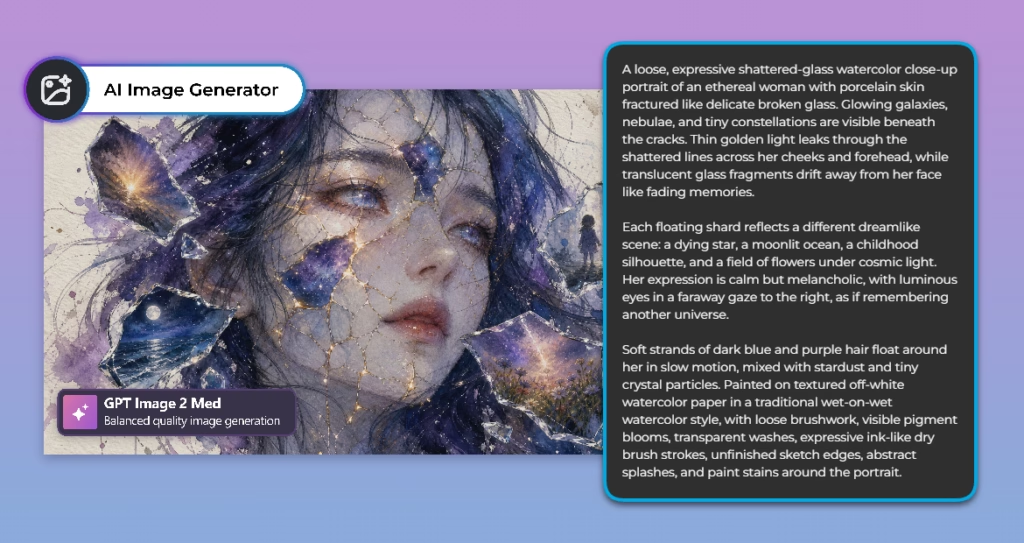
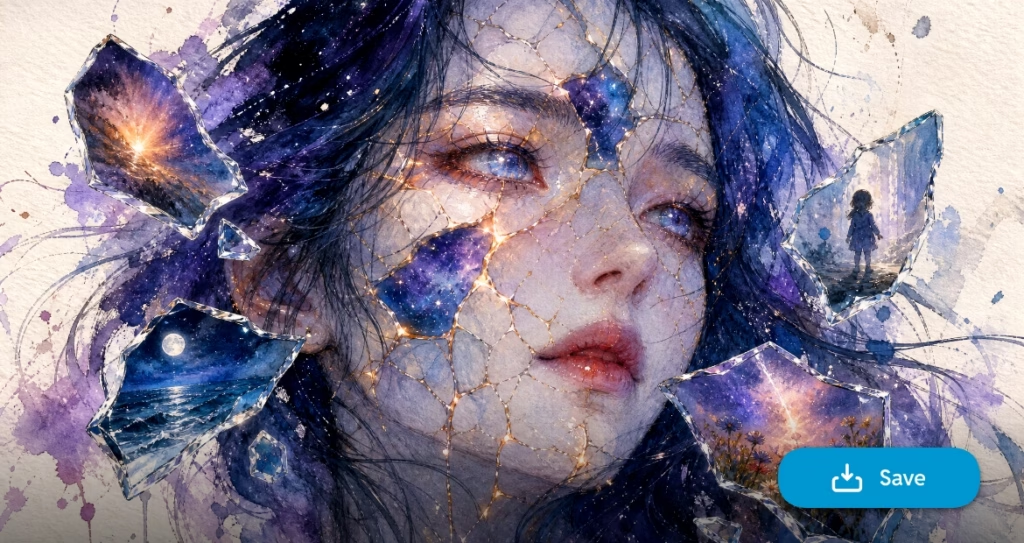
Subject: An ethereal woman with porcelain skin.
Concept: Porcelain skin fractured like delicate broken glass; glowing galaxies, nebulae, and tiny constellations visible beneath the cracks; translucent glass fragments drift away from her face like fading memories.
Art Style: Loose, expressive shattered-glass watercolor; traditional wet-on-wet watercolor style; loose brushwork, visible pigment blooms, transparent washes, expressive ink-like dry brush strokes, unfinished sketch edges, abstract splashes, and paint stains.
Mood: Calm but melancholic; faraway gaze with head tilted slightly to the right; as if remembering another universe.
Lighting: Thin golden light leaks through the shattered lines; cosmic light.
Colors: Porcelain, golden light, dark blue and purple hair, stardust, tiny crystal particles, off-white watercolor paper.
Background: Textured off-white watercolor paper with abstract splashes and paint stains around the portrait.
Composition: Close-up portrait; shattered lines across her cheeks and forehead; soft strands of dark blue and purple hair float around her in slow motion; each floating shard reflects a different dreamlike scene: a dying star, a moonlit ocean, a childhood silhouette, and a field of flowers under cosmic light.
Once you are done, choose your AI model, quality, and aspect ratio. Finally, click Generate.
Step 2: Review and Refine
Review each generated result and choose the best image. Pick the version that best matches your prompt, style, and project goal. Look for a clear subject, balanced composition, appealing colors, and a consistent AI art style.
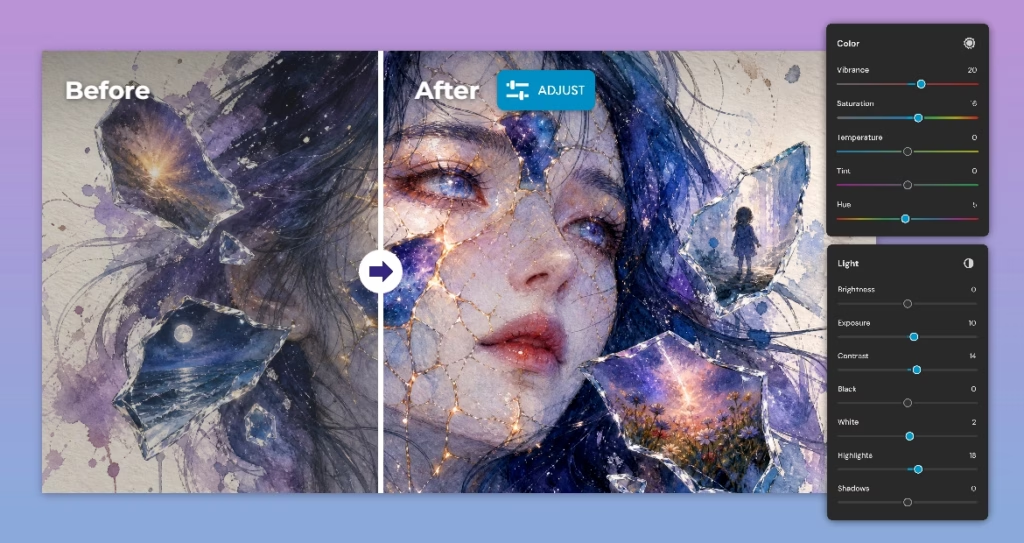
Your image does not need to be perfect yet. You can polish the image in Pixlr Express before exporting.
Open your chosen image in Pixlr Express and use the Adjust panel to refine the overall look. Make small edits so your AI-generated artwork keeps its original style. Stronger contrast and color work well for anime, comic, fantasy, and cyberpunk art designs. Softer styles, like watercolor art or folded paper art, often look better with subtle adjustments.
Once refined, crop the image for social media, ads, posters, or profile images. You can also add text, overlays, shapes, backgrounds, and branding elements in Pixlr Express.
These final edits turn AI-generated art into a polished visual asset for any creative project.
Step 3: Save Your Image
Once you are happy with your result, save your image in the format that best fits your project. Use PNG for high-quality visuals with sharp details, or JPG for smaller file sizes for easier sharing online.
6 Digital Art Style Prompts
One of the easiest ways to explore AI digital art styles is to test the same idea across multiple styles by combining a clear subject with style-specific keywords, lighting details, color palettes, and composition cues.
Whether you want bold comic book AI art, a nostalgic pixel art look, playful 3D clay art, or experimental cyberpunk art, the right prompt helps Pixlr AI understand the exact visual mood you want.
Use these AI art style prompts as starting points, then customize the subject, colors, setting, and mood to match your creative project. With the Pixlr AI Image Generator, you can experiment with a variety of AI-generated art styles to find the one that suits your purpose or project.
1. Neon Cyberpunk Art
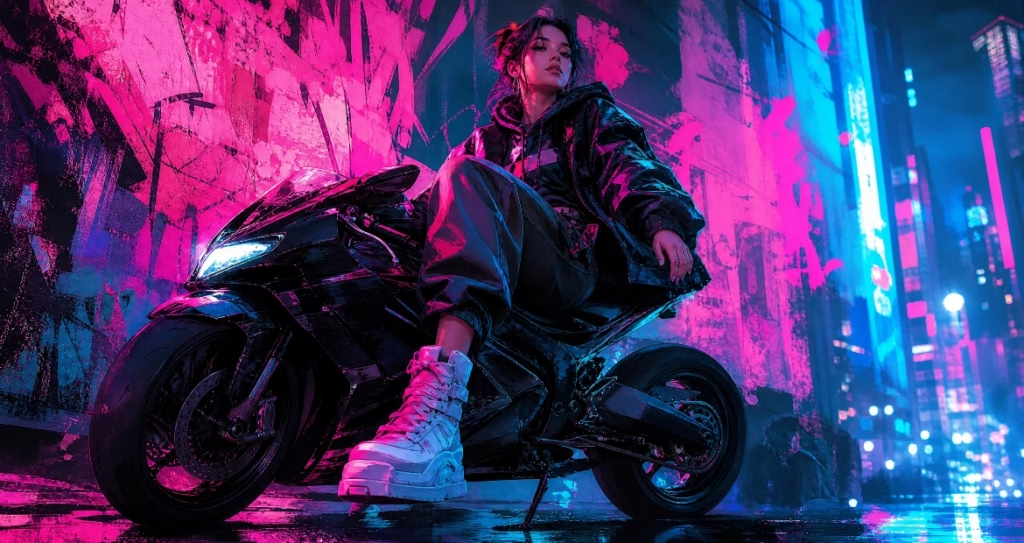
Neon Cyberpunk Art combines futuristic city visuals with rebellious street graffiti energy. This style works well when you want high contrast, glowing colors, expressive lines, and a bold urban atmosphere.
Best for: Music covers, streetwear campaigns, gaming posters, nightlife visuals, social media edits, and futuristic branding.
PROMPT: A low-angle shot of a neon cyberpunk fashion graffiti illustration featuring a stylish young adult woman with a calm confident expression, looking slightly off-camera, with neon highlights on her futuristic baggy street clothing, sitting sideways on a glossy black sport motorcycle, one leg crossed forward and extended down, one hand resting on the motorcycle tank, chaotic urban markings, hot pink and cyan highlights, rough digital brushwork, blacklight colors, expressive sketchy linework, layered poster texture, playful rebellious mood, high contrast, electric magenta and blue palette, and a cinematic futuristic city atmosphere, bokeh background, rule of third composition. No logo, no text.
2. 3D Clay Art
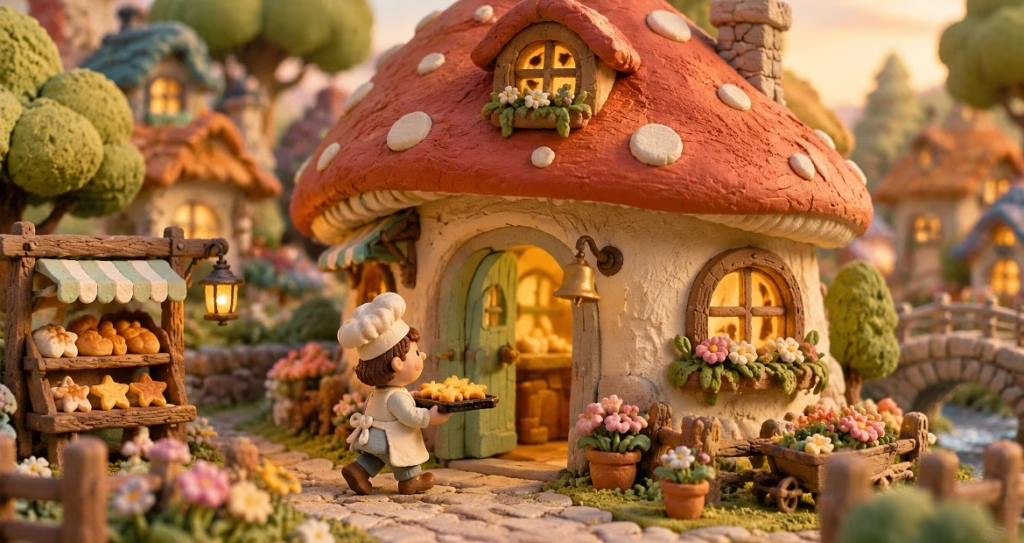
3D clay art is soft, rounded, tactile, and playful. It often looks handmade, making it great for friendly brands, cozy scenes, and fantasy-inspired designs. Add words like “matte clay,” “rounded edges,” “handcrafted,” and “miniature diorama” to guide the AI image generator style.
Best for: Cute brand visuals, children’s content, app graphics, product icons, social posts, and whimsical storytelling.
PROMPT: Isometric close-up view of a tiny handcrafted claymation mushroom village, centered on a charming fantasy cottage with a red mushroom roof with white spots, small brick chimney, arched windows, pastel green door, and tiny flower garden. Surrounding the house are soft puffy clay trees, rounded bushes, miniature cobblestone paths, colorful flower beds, and whimsical pastel mushroom houses in the background. Everything looks sculpted from soft matte clay with visible handmade textures, rounded edges, tactile details, cozy fairytale atmosphere. Warm golden sunlight, soft shadows, macro photography, shallow depth of field, tilt-shift miniature effect, blurred foreground flowers, dreamy bokeh background, highly detailed, cute, whimsical, pastel colors, 3D claymorphism, clay diorama, cozy village scene.
3. Folded Paper Art
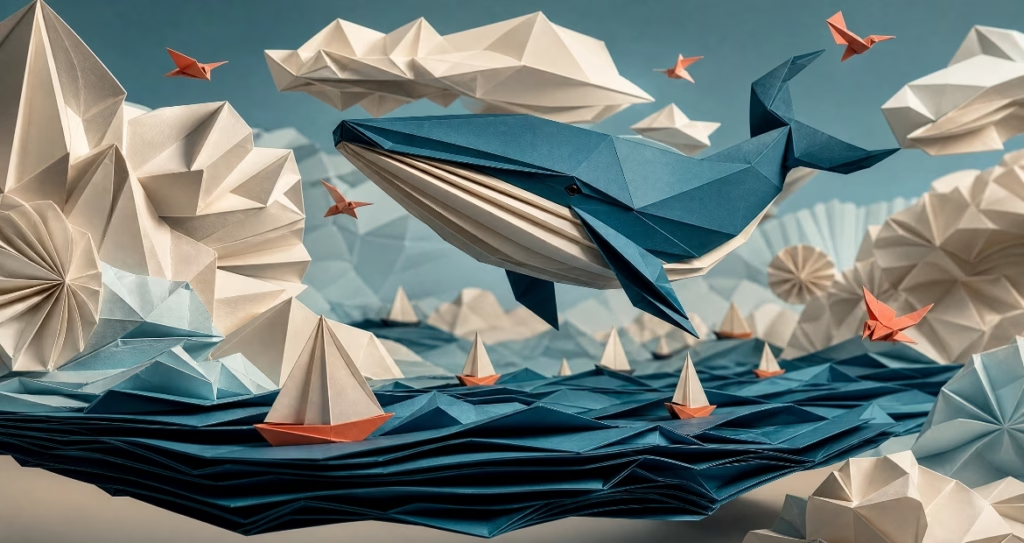
Folded paper art creates the illusion of layered paper cutouts, soft shadows, and handcrafted depth. This style is ideal when you want a clean, artistic look that feels polished but still tactile. It works especially well for nature scenes, abstract compositions, animals, travel posters, and product campaigns.
Best for: Editorial graphics, posters, greeting cards, environmental campaigns, educational content, and minimalist design.
PROMPT: A layered folded paper art illustration of a serene mountain landscape at sunrise, featuring rolling hills, pine trees, a winding river, and a glowing sun rising behind the peaks. Each element is made from carefully folded and cut paper layers with crisp edges, subtle paper grain texture, soft realistic shadows, and a dimensional handcrafted look. Use a calming pastel color palette with warm peach, soft blue, sage green, and cream tones. Minimalist composition, clean background, balanced negative space, elegant paper sculpture effect, editorial poster style, peaceful mood, highly detailed folded paper art, no text, no logo.
4. Comic Art
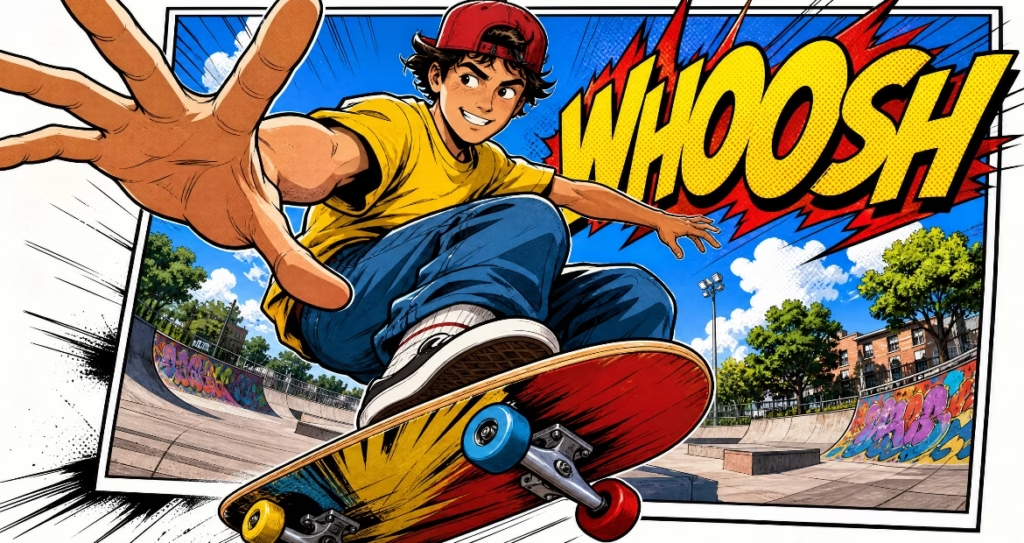
Comic art is one of the most recognizable art styles because it uses bold outlines, dramatic expressions, dynamic posing, and strong color contrast. For a classic comic look, include terms such as “ink outlines,” “halftone dots,” “cel shading,” “speech-bubble layout,” and “dynamic action composition.”
Best for: Action posters, gaming graphics, sports visuals, social media posts, YouTube thumbnails, character art, event flyers, merch designs, and bold pop-art campaigns.
PROMPT: Comic art illustration of a young person skateboarding out of a comic panel; the panel background is a neighbourhood skate park, shown in a dynamic, low-angle, ultra-wide fisheye perspective with exaggerated comic proportions, his expressive face close to the viewer and the skateboard angled beneath his feet, while glancing confidently to the side. Add dynamic text in bold behind “Whoosh”. Include cel-shaded skin, one hand reaching toward the viewer, the other out for balance, colorful wheels, retro skateboard deck, motion lines, bold clean ink outlines, halftone dot texture, exaggerated lighting, cinematic shadows, high-contrast primary colors, dynamic comic book cover composition, energetic action atmosphere, pop-art colors, crisp comic shadows, blue sky, plaza pavement, trees, vibrant summer mood, high contrast, polished digital comic illustration. Do not add extra text. No logo.
5. Pixel Art
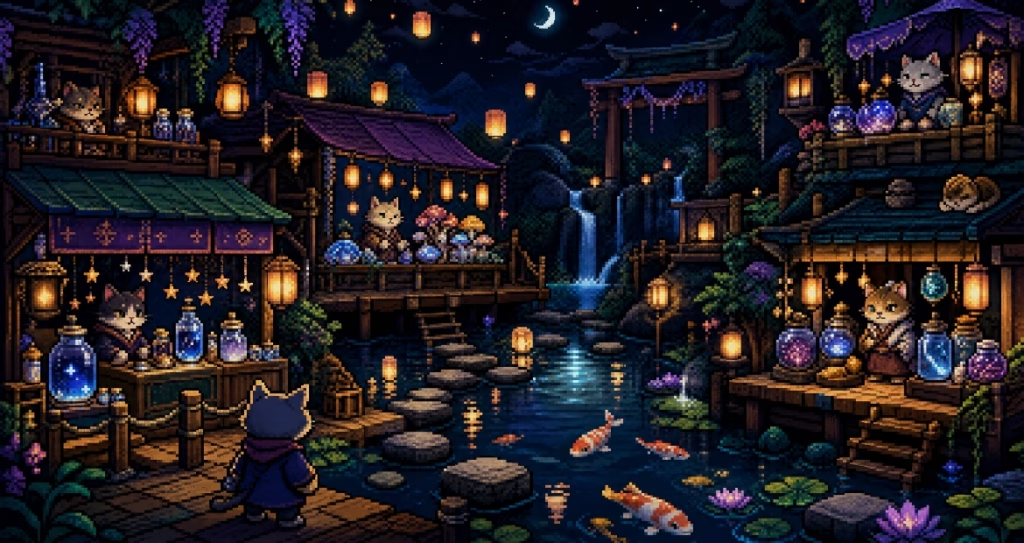
Pixel art is a classic digital illustration style inspired by retro games and 8-bit or 16-bit visuals. A pixel art AI image generator prompt works best when you describe the subject clearly and ask for blocky shapes, limited colors, crisp pixel edges, and a game-like composition.
Best for: Game assets, retro posters, Twitch graphics, profile icons, stickers, and nostalgic digital artwork.
PROMPT: A richly detailed 16-bit pixel-art RPG environment depicting a secret midnight market suspended above a tranquil koi pond. Tiny wooden stalls sell bottled starlight, glowing mushrooms, and miniature constellations in glass jars. Floating lanterns illuminate pixelated kitty merchants, stepping stones, rippling water, and colorful koi swimming in the pond. Crisp square pixel clusters, deliberate dithering, limited indigo, emerald, amber, and lavender palette, readable silhouettes, layered foreground and background, carefully placed light pixels, charming environmental storytelling, classic side-scrolling adventure-game composition. Authentic retro game graphics, no smooth gradients, no photorealism, no text, no logo.
6. Anime-inspired illustration
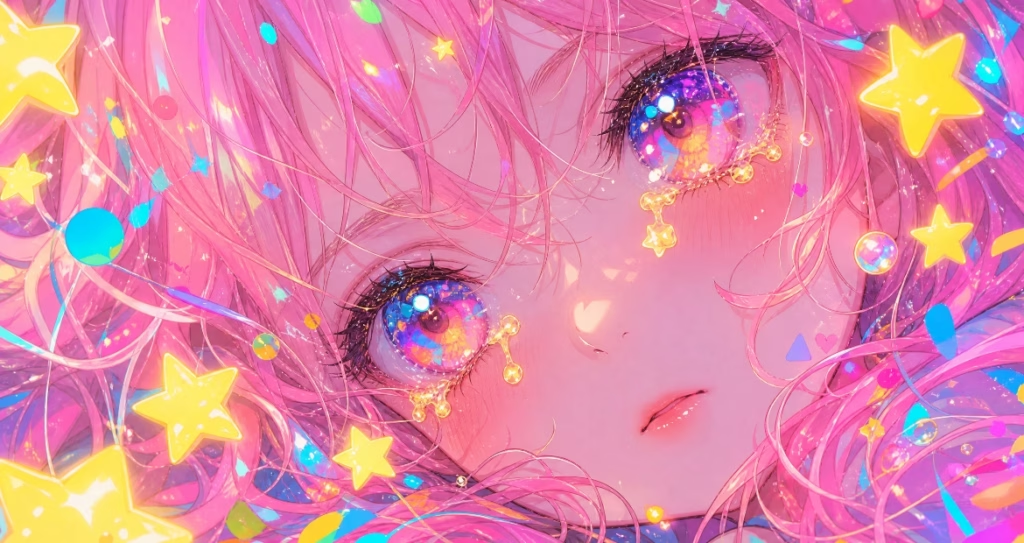
Anime-inspired illustration is an iconic digital art style known for expressive characters, cinematic lighting, atmospheric backgrounds, and strong emotional storytelling. It works especially well for portraits, fantasy scenes, school-life concepts, futuristic cities, and dreamy landscapes.
Best for: Character design, posters, fantasy scenes, profile pictures, story covers, and emotional visual storytelling.
PROMPT: An ultra-detailed anime-inspired digital illustration, extreme close-up portrait of a young girl’s face tilted diagonally, filling the entire frame. She has large glossy expressive eyes with rainbow galaxy-like reflections, sparkling multicolor highlights, tiny paint-like color fragments inside the irises, and delicate bright glowing yellow star-shaped tears gathering under both eyes. Soft pink blush skin, small subtle mouth, emotional dreamy expression, slightly melancholic and mesmerized. Long wavy pastel pink hair surrounds her face, with loose strands crossing over her forehead and eyes. Glowing yellow stars of different sizes float around her face and hair, each star with rounded tips and bright white highlights, and tiny colorful abstract shapes. In the background, add cyan, yellow, pink, green, and orange reflections.
Start Creating AI Digital Art Styles With Pixlr
Exploring different AI digital art styles is one of the fastest ways to expand your creative direction without starting from scratch. With the Pixlr AI Image Generator, you can turn a simple idea, photo, product, or character concept into a wide range of visual styles, from comic art and pixel art to 3D clay art, folded paper art, anime-inspired illustration, and cyberpunk graffiti art.
The best results come from specific, descriptive prompts. Instead of only naming a style, describe the subject, mood, lighting, colors, composition, and texture. This gives Pixlr AI more creative direction and helps produce visuals that feel intentional, polished, and ready for real design use.
Whether you are creating social media content, posters, profile images, branding visuals, game-inspired graphics, or experimental artwork, Pixlr makes it easier to test multiple AI-generated art styles in minutes. Start with the prompts above, adjust them to fit your project, and keep refining until you find a look that matches your creative vision.