

Every moment with Mom tells a story, but not every photo captures it perfectly. Whether it’s a blurry snapshot, poor lighting, or a distracting background, some of your most treasured memories can feel lost in a less-than-ideal photo. Those faded family portraits, yellowed Polaroids, or candid shots may not look flawless, but they hold deep sentimental value that deserves to be shared.
This Mother’s Day, don’t just post any photo. Just share the one that truly reflects the moment. With Pixlr’s AI tools, you can easily transform those imperfect photos into stunning memories. Pixlr’s AI can adjust everything from color and lighting to sharpness and background removal, ensuring your photos look as warm and clear as the moments they capture.
Creating beautiful Mother’s Day photos with Pixlr’s AI features is quick and simple. Whether you want to enhance a cherished portrait or improve a spontaneous shot, Pixlr’s AI editing tools help bring your photos to life with just a few clicks.
Why Use AI for Mother’s Day Photo Editing?
When it comes to celebrating Mom, the perfect photo is everything. But let’s face it—sometimes the shot you captured doesn’t quite match the memory you want to share. That’s where AI comes in. With advanced AI tools, you can transform any Mother’s Day photo into a stunning masterpiece. AI photo editing not only enhances image clarity but also perfects colors, improves lighting, and sharpens details. Whether it’s fixing a blurry snapshot or adding that extra touch of warmth, AI can help you make your photos look as beautiful as the moment felt. This Mother’s Day, skip the frustration and let AI bring your photos to life with ease.
Creative Mother’s Day Photo Ideas for Social Media
Mother’s Day is the perfect opportunity to express your love and appreciation through photos. With a little creativity, your posts can stand out on social media. Instead of sticking to a typical family portrait, capture moments that tell a deeper story. Consider snapping a candid shot of Mom laughing with her kids or taking a close-up of a hand-written note surrounded by flowers. You could also recreate an old family photo for a vintage-inspired shot or capture behind-the-scenes moments of preparing a Mother’s Day surprise. These personal touches will resonate with your audience. Enhance the impact of these photos with a unique filter or use AI tools to improve colors and clarity, ensuring your Mother’s Day photos are both memorable and shareable.

How Pixlr’s AI Transforms Your Mother’s Day Photos
Pixlr’s AI tools bring a whole new level of enhancement to your Mother’s Day photos, turning everyday snapshots into extraordinary memories. Whether you’re working with a picture that’s poorly lit, has a distracting background, or lacks the sharpness you want, Pixlr’s AI editing features can help. With just a few clicks, Pixlr automatically adjusts lighting, improves color saturation, and sharpens details, so your photos look as vibrant and clear as the moment they were captured.
Additionally, Pixlr’s AI-powered background removal lets you easily swap out cluttered or distracting backgrounds, placing your mom in the perfect setting for her special day. You can also use Pixlr’s AI editing tool to enhance skin tones, making portraits look more natural and flattering. Whether you want to give a candid photo a professional touch or revive an old family snapshot, Pixlr’s AI tools ensure that every detail is polished and ready to share. This Mother’s Day, let Pixlr’s AI transform your photos into something truly special, saving you time while delivering stunning results.

Step-by-Step Guide: Create Stunning Mother’s Day Posts in Minutes
Creating the perfect Mother’s Day post is easier than you think. With Pixlr’s AI tools, you can transform any photo into a heartfelt post in just 5 minutes. You don’t need any design experience or complicated software. Whether your photo needs a little touch-up or a complete makeover, Pixlr’s AI can help you craft an image that Mom will be proud to share. Here’s how to do it quickly and easily.

Step 1: Superscale for Higher Quality
Start by enhancing the clarity and sharpness of your photo. Traditional upscaling can make images blurry, but Pixlr’s AI Superscale adds detail and improves resolution using advanced neural networks. This results in a high-quality image that looks naturally enhanced.

Step 2: Fix Lighting and Background with AI
Upload your photo and use Auto Adjust for instant image enhancement, as this AI photo editing tool perfectly balances lighting and color. It’s the ultimate photo enhancer for a quick, polished look. To make Mom pop, use the AI Remove Background tool to isolate the subjects. Adding photo effects like a white outline or glow to the cutout is one of the best photo ideas to fix a cluttered background. Whether you’re applying filters or creating unique Mother’s Day gift ideas, Pixlr makes portrait editing simple for all your celebrations.
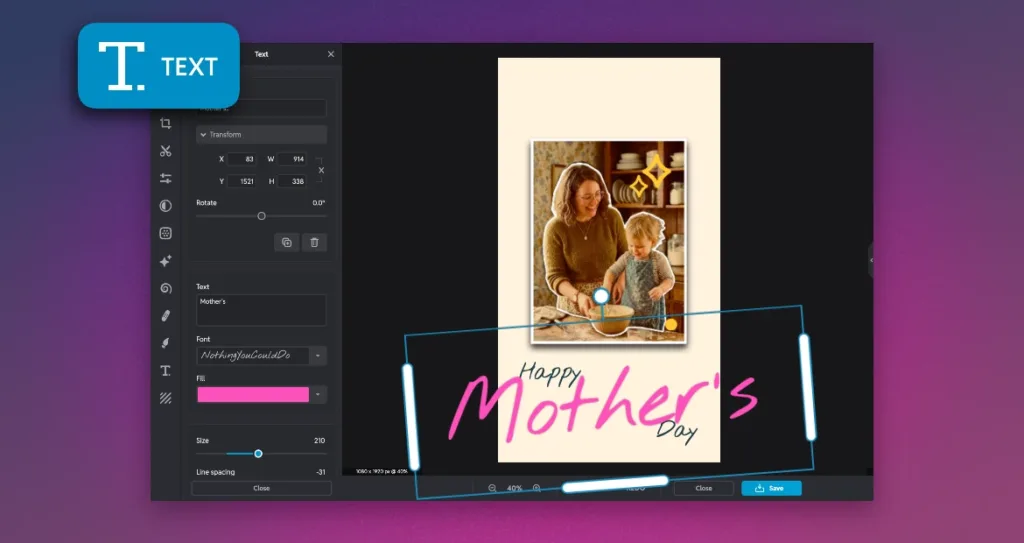
Step 3: Add Personal Messages
Use the text tool to add a meaningful message such as “Happy Mother’s Day, Mom” or “For the woman who made everything possible.” Pick a font that matches the tone: a script font for a personal touch, bold for a modern look, or serif for something timeless. Position the text where it complements the photo naturally.
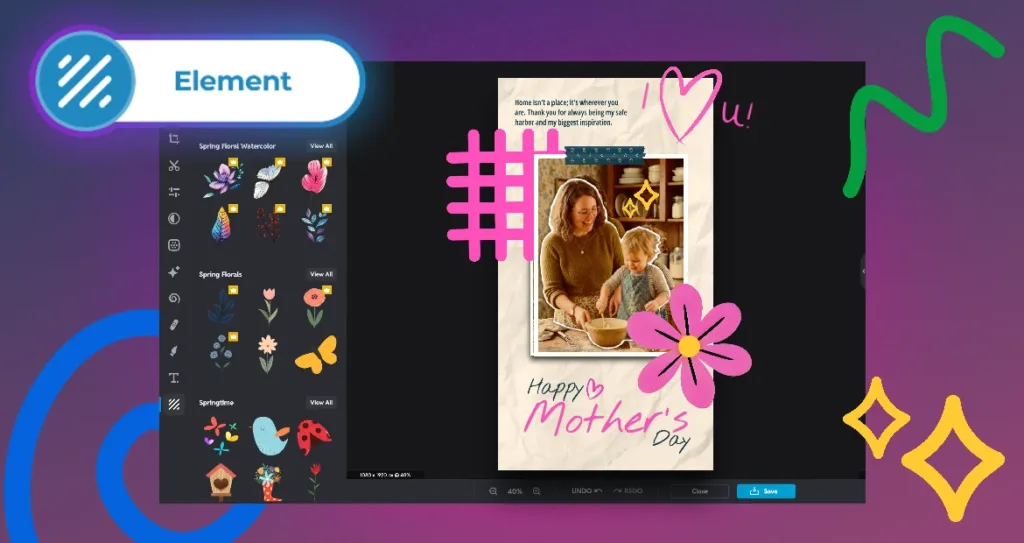
Step 4: Enhance with Pixlr Elements
Browse Pixlr’s library of decorative elements to add special touches like floral prints, soft frames, or subtle textures. Keep it simple. Two or three small additions are all it takes to give your photo a polished, intentional design.
Personalize Mother’s Day Photos with Pixlr’s Filters
Make your Mother’s Day photos truly unique by adding a personal touch with Pixlr’s wide range of filters. Whether you want to create a soft, vintage look or add vibrant, eye-catching colors, Pixlr’s filters give you the flexibility to customize your photos to fit the perfect mood. These filters can enhance the warmth and charm of your images, bringing out the best in every moment captured. From soft pastels to rich tones, Pixlr’s filters help elevate your photos with ease. Customizing your images with these filters ensures that your Mother’s Day photos reflect the love and care behind the moment, adding a personal flair that makes them stand out and more memorable.

Make Your Mother’s Day Posts Shine on Social Media with Pixlr
With Pixlr’s AI tools, creating the perfect Mother’s Day photo post has never been easier. Whether you’re enhancing a timeless portrait or capturing a candid moment, Pixlr allows you to make every image look professional and personal. As you share your heartfelt memories with family and friends on social media, you can be confident that your photos will stand out and capture the essence of your love and appreciation for Mom. This Mother’s Day, let Pixlr’s AI tools help you create stunning images that not only reflect the beauty of the moment but also leave a lasting impression on those who see them.