Black Friday has a look of its own.
Think bold colors, bright neon lights, dramatic contrasts, big numbers, and products that seem to jump right out of the screen. It is exciting, energetic, and a little hard to ignore.
But creating a Black Friday visual does not mean you have to follow one exact style.
Maybe you want a glowing neon poster. Maybe you want something cleaner with a huge discount as the main focus. Maybe your product deserves to take center stage with only a few bold design elements around it.
That is the fun part.
With Pixlr, you can take a simple product image and turn it into a Black Friday visual that feels like your own. You can experiment with colors, typography, layouts, backgrounds, effects, and more until you find a look that works.
Let’s explore some ideas first, then create a Black Friday promotional ad together in Pixlr E.
Give Your Black Friday Design a Reason to Stand Out
With so many Black Friday promotions appearing at the same time, it is easy for one design to blend into another.
A huge “50% OFF” might catch someone’s attention for a second. But what makes them stop and actually look at your design?
It starts with the idea behind the visual.
Start With the Idea, Not the Effects
Before adding neon, glow, shadows, or other effects, think about what you want your visual to say.
Is the star of the promotion a product? A huge discount? A special bundle? A limited-time offer?
Choose the one thing you want people to notice first.
Once you know that, the rest of the design becomes easier. Your colors, typography, product placement, and decorative elements can all work together around that idea.
This also gives you more freedom to be creative. You are not simply adding effects because there is empty space. You are building a visual around a message.
Let Your Product Take the Spotlight
Your product is already an important part of your story, so let it be seen.
A clean product image can work beautifully against a bold background. You can make it large and central, place it to one side, or build your text around it.
You can even play with scale. A large product can create a dramatic look, while several smaller products can make a bundle feel more exciting.
Try moving the product around your canvas before deciding where it belongs. Sometimes a small change in position can completely change the feeling of the design.
Make the Offer Part of the Design
The offer should feel like part of the visual rather than information added at the end.
If your promotion is 50% OFF, make those numbers impossible to miss.
If you are promoting a bundle, show the products together.
If your campaign has a limited-time offer, make the timing visible.
You can use size, color, contrast, and placement to give the offer the attention it deserves.
The goal is simple: when someone looks at your design, they should quickly understand what makes the promotion worth noticing.
Find Your Black Friday Look
Now comes the fun part: deciding what your Black Friday design should actually look like.
Neon is a natural starting point. A dark background with bright pink, electric blue, purple, green, or yellow can instantly create that familiar Black Friday energy.
But you do not have to stop there.
Try a bright neon glow behind your product. Make the discount huge and let it take up most of the canvas. Place the product slightly off-center and use the empty space for your headline. Add glowing lines around the edges. Use a strong gradient to bring the eye toward the middle of the design.
You can also play with typography.
A giant “50%” can become the main visual element. A stacked headline can give your design a more editorial feel. Large text placed behind a product can create depth.
And if you prefer something simpler, keep the background dark, make the product large, and let one bright color do most of the work.
There is no single Black Friday look you have to follow.
Think of the familiar neon-and-high-contrast style as your starting point, then make it yours.
How to Create a Black Friday Sale Poster in Pixlr Editor
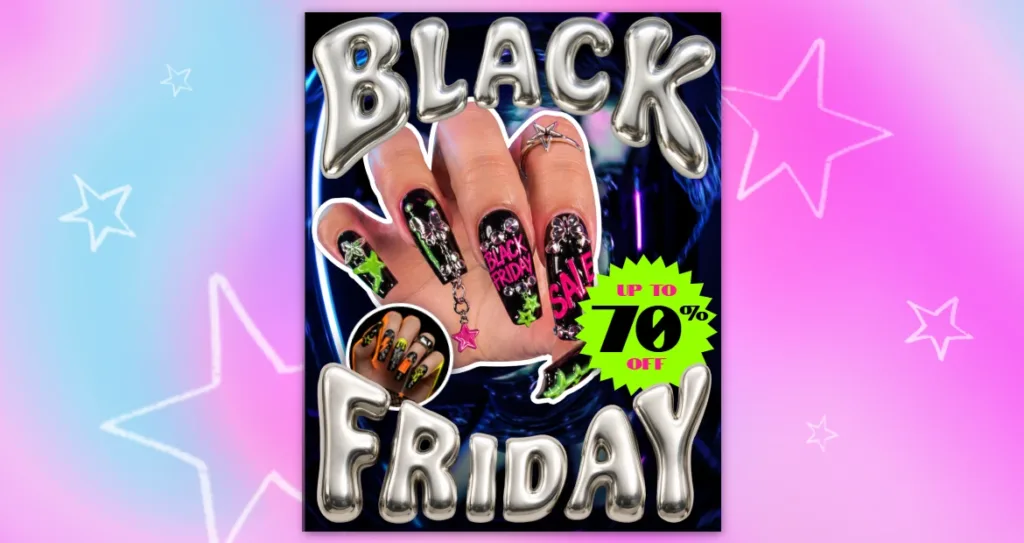
Let’s create a bold Black Friday manicure sale poster using Pixlr Editor. We’ll start with an AI-generated image, build a blue-toned background, highlight the manicure, and finish with a bright discount badge and chrome-style text.
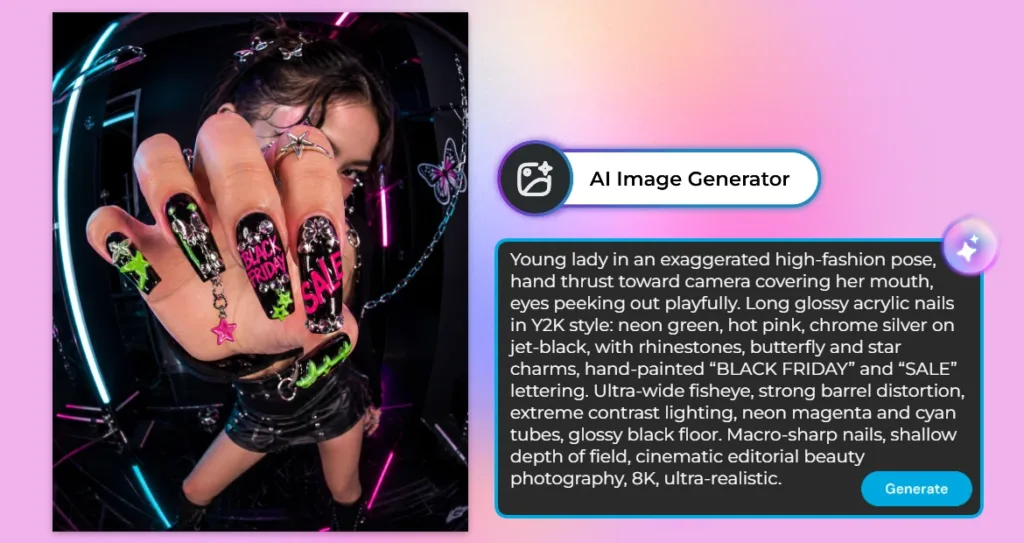
Step 1: Generate the Image
Open Pixlr AI Image Generator and enter a prompt describing your desired manicure poster image. Include details such as the model’s pose, nail art, lighting, and background. Click Generate and choose your preferred result.
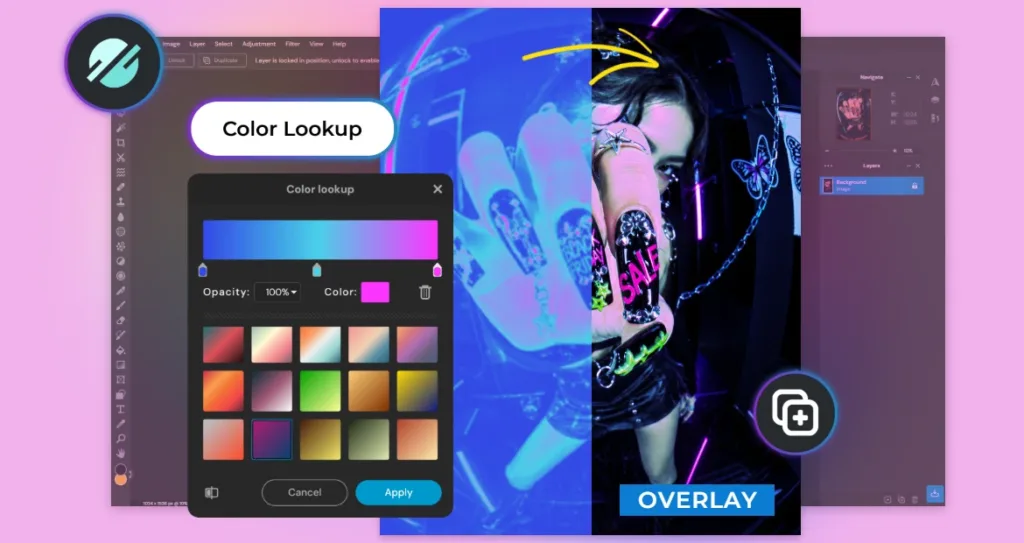
Step 2: Create the Background
Open Pixlr Editor and place your generated image on a new canvas. Duplicate the image layer, then go to Adjustment and select Color Lookup. Choose a gradient color to create a blue-toned effect, then set the layer’s blend mode to Overlay.
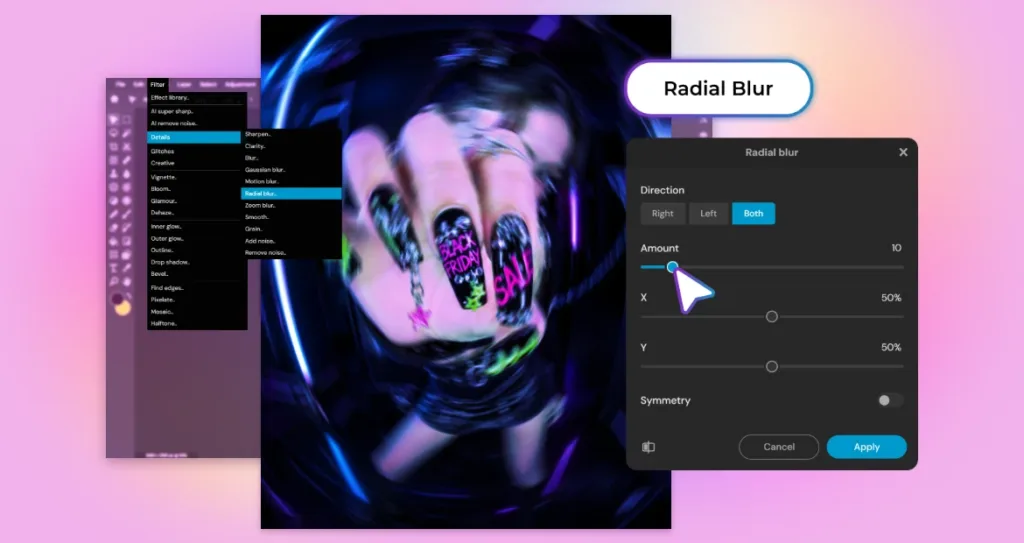
Step 3: Apply Radial Blur
Select the image layer and go to Filter > Details >Radial Blur. Adjust the direction and the X and Y settings to create a swirling background effect. Apply the blur to give the image more movement and depth.
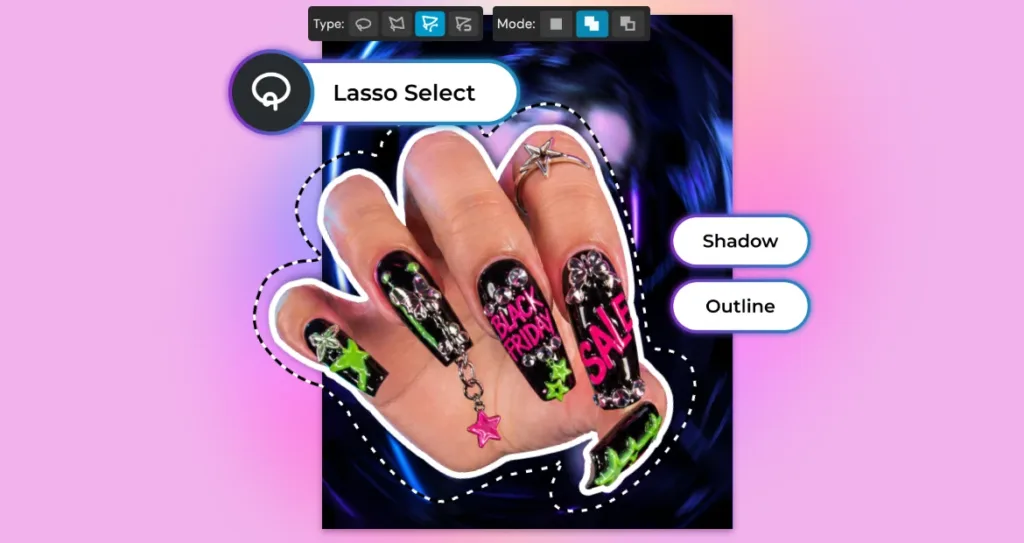
Step 4: Cut Out the Hand
Use the Lasso Select tool to select the hand from the original image. Cut out the selection and place it above the blurred background. Then go to Filter and apply Outline and Drop Shadow to make the hand stand out.
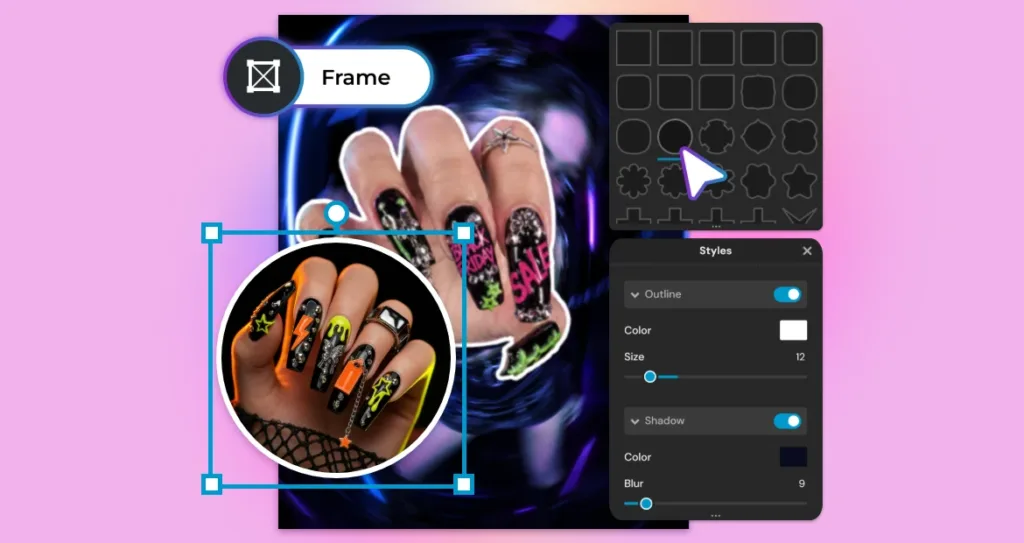
Step 5: Add a Close-Up Frame
Select the Frame tool and choose a circular frame. Add a close-up manicure image inside it, then apply an outline and shadow using the frame style settings. Place the frame near the lower-left side of the hand to highlight the nail art.
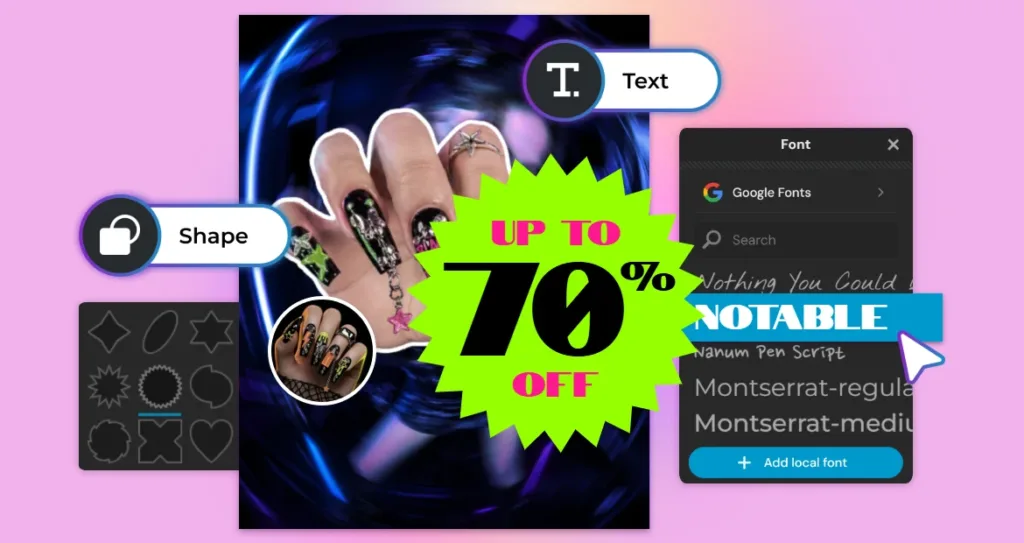
Step 6: Create the Discount Badge
Use the Shape tool to add a starburst shape to the right side of the poster. Add the text “UP TO 70% OFF” over the shape, then adjust the font, size, and colors to make the offer stand out.
Step 7: Add Chrome Black Friday Text
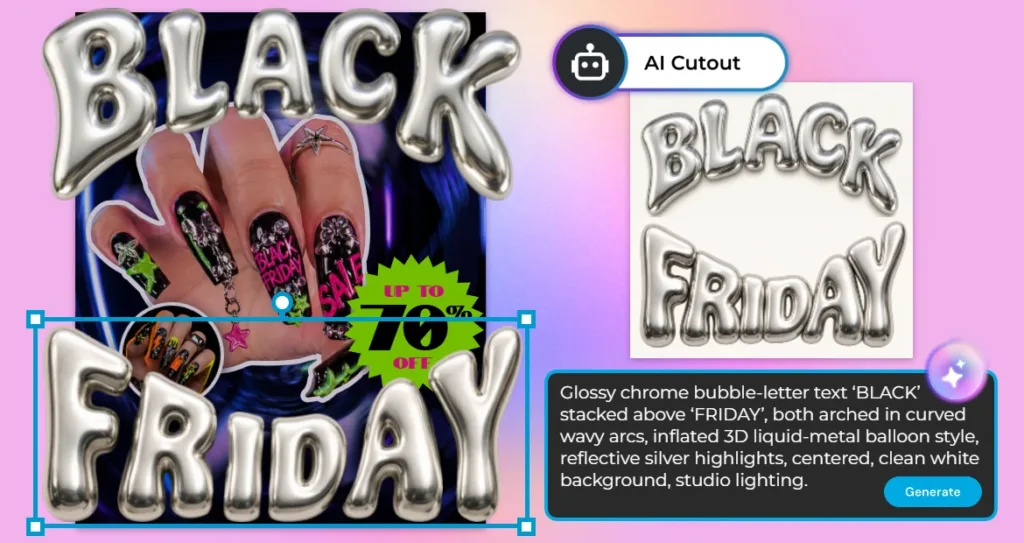
Use Pixlr AI Image Generator to create chrome-style “BLACK FRIDAY” lettering. Open the generated image in Pixlr Editor and use AI Cutout to remove its background. Place “BLACK” at the top and “FRIDAY” at the bottom of the poster, adjusting the size and position to frame the manicure.
Step 8: Finalize Your Poster
Check the placement of the hand, close-up frame, discount badge, and text. Make any final adjustments so the manicure remains the focus and the sale offer is easy to read. Your Black Friday sale poster is ready!
Your First Design Doesn’t Have to Be Your Final One
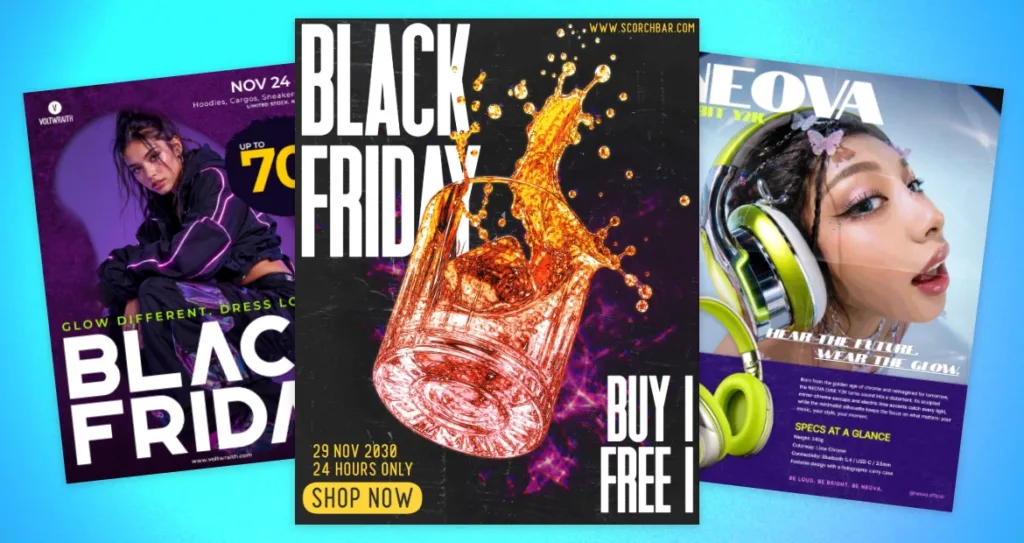
One Black Friday idea can lead to many different designs. With Pixlr Editor, you can explore different styles and create posters that each have their own look and feel.
Go bold with oversized typography and glowing neon colors, create an energetic product poster with dramatic lighting, or try a magazine-inspired layout with eye-catching images and playful text. Each design gives you a different way to express your creative ideas.
You don’t need to follow one fixed style. Experiment with different images, colors, fonts, and layouts until you find a look that works for your product or promotion. Whether you’re designing a manicure sale poster, a fashion promotion, or a product advertisement, Pixlr gives you the freedom to bring your ideas to life.
Start with an idea, explore different creative directions, and see what you can create with Pixlr Editor.
Keep the Excitement Without Losing the Message
Black Friday designs are meant to be bold. Bright colors, large text, glowing effects, and eye-catching details can all help your design stand out. But when everything is trying to grab attention at once, your main message can easily get lost.
Take a final look at your design and find the first thing your eyes go to. Is it the product or the main offer? Then check whether the discount and CTA are easy to find. If too many elements are competing for attention, simplify the design by reducing some effects or giving the important elements more space.
You do not have to make your design less exciting. Just give each element a clear role. Let the product, promotion, and CTA lead the viewer through the design while the colors, lighting, and effects create the Black Friday energy around them.
Bring Your Black Friday Ideas to Life with Pixlr
Black Friday is a great excuse to think bigger with your visuals.
Start with a simple product image. Add a bold idea. Play with neon colors, typography, lighting, composition, and effects. Move things around until the design starts to feel like your own.
You do not need to be a professional designer to experiment.
With Pixlr Editor, you can take your ideas from a blank canvas to a finished Black Friday promotional ad, one creative decision at a time.
So, what will your Black Friday design look like?
Open Pixlr and start creating.